
Close Menu

    Subscribe to Updates

    Get the latest creative news from FooBar about art, design and business.

    What's Hot

    Neverness To Everness (NTE) Bug Fix – Infinite Loading Screen 100%

    April 30, 2026

    Neverness to Everness – How to Unlock the Blue Flame Bike

    April 29, 2026

    Far Far West – All Correct Answers to Rules of the West Quiz

    April 29, 2026
    Facebook X (Twitter) Instagram
    TheGamesWatchTheGamesWatch
    • Guides
    • Features
    TheGamesWatchTheGamesWatch
    Home»Guides»Heartopia – How To Change Hair (& Get More Hairstyles)
    Guides

    Heartopia – How To Change Hair (& Get More Hairstyles)

    By Kirthana KJanuary 9, 20263 Mins Read

    Key Points

    • You need to interact with the mirror inside the Clothing Store to change hairstyles.
    • You will find the clothing store in Residential Street.
    • Some hairstyles will require Gold or Wishing Stars to unlock them.

    Heartopia lets you customize your character however you wish, and it doesn’t just include the clothes you wear. You get to change your hairstyle to suit your mood, and the game does offer a huge collection to pick from. You need to find the right place to change your hair, and also find ways to unlock new hairstyles.

    Heartopia – Changing Hairstyles Overview
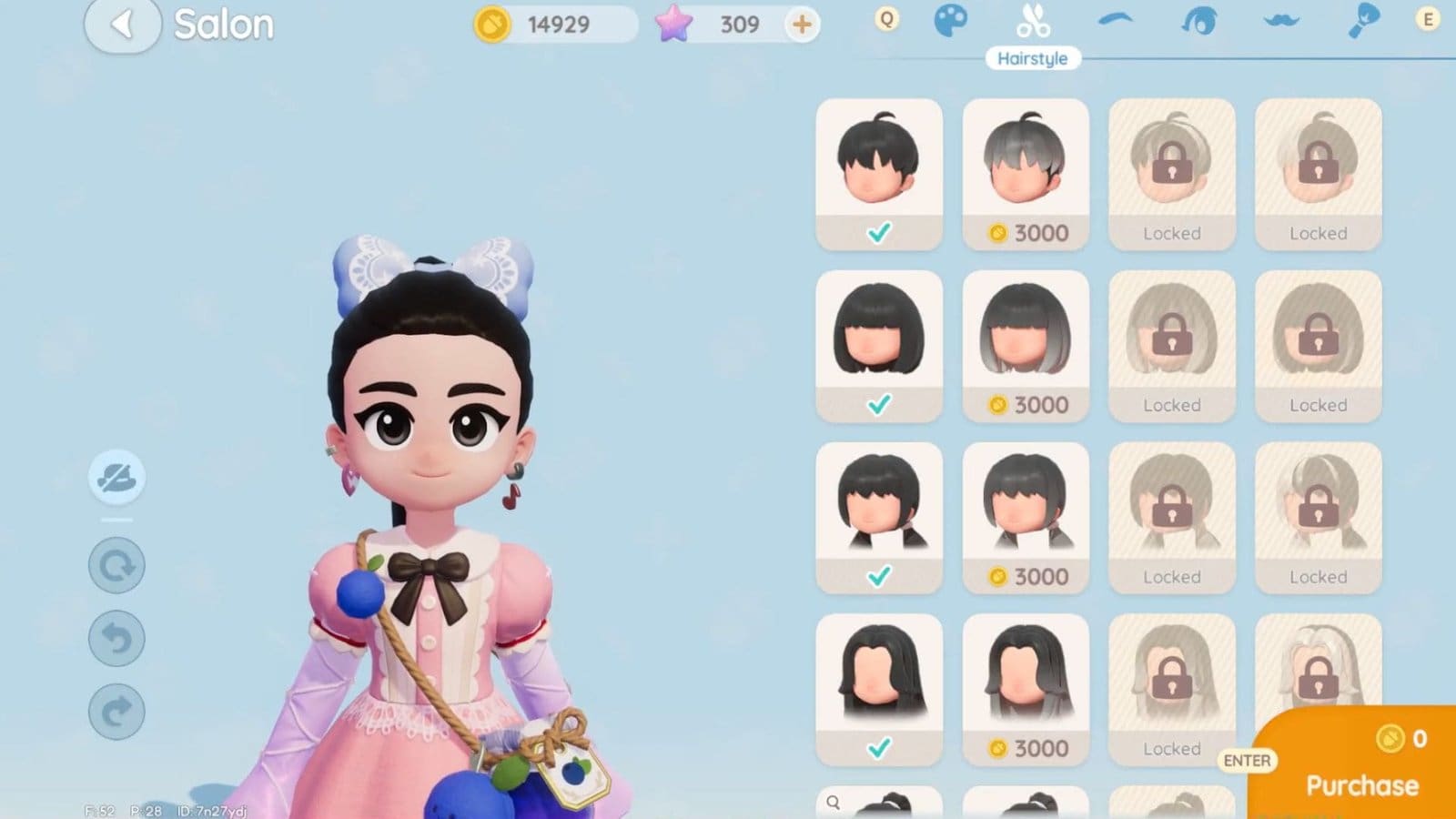
    Change Hair Heartopia
    How to getInteract with the mirror on the second floor.
    LocationClothing Store, Residential Street.
    RequirementsGold, Wishing Stars
    Other methodsGilded Acorn Exhibition, leveling up

    How to Change Hair in Heartopia

    Visit the newly opened clothing store at the southern section of Residential Street and head up to the second floor. Over here, you will spot several vanity mirrors. Interact with a mirror and select the Hairstyle tab on top. Then, scroll down to find your preferred hairstyle. The clothing store unlocks after progressing through the main quests a bit, and you will get a letter from Dorothee telling you about the store. 

    How to Change Hair Color in Heartopia

    Most of the hair colors will be locked behind various requirements. Some ways to unlock different hair colors are:

    • Using Wishing Stars or Gold.
    • Rerolling in the Gilded Acorn Exhibition.
    • Completing quests and leveling up.

    While selecting a hair color, you will be shown the unlock requirements at the bottom of the screen. After unlocking the hairstyle variation, select the dropper tool on the left side of the screen. This will reveal a color palette, and you get to pick any color you would like from here. Once confirmed, click on the payment button on the bottom right corner.

    How to Get More Hairstyles

    Unlocking new hairstyles follows the same process of getting a new hair color. Leveling up, purchasing them using Gold or Wishing Stars, or rerolling for them are some of the ways to get new hairstyles. Most hairstyles will cost:

    • 2,000 Gold.
    • 30 Wishing Stars.
    • Obtained after leveling up to level 4 and beyond.

    FAQs

    Where can I change my hair?

    Visit the clothing store once unlocked and head up to the second floor. Interact with the mirror and select the hairstyle option to change your hair.

    How do I get more hairstyles?

    You can unlock new hairstyles by spending Gold or Wishing Stars, leveling up, or participating in the Gilded Acorn Exhibition reroll.

    How do I change my hair color?

    After purchasing your required hairstyle, select the dropper icon on the left and choose your preferred color.

    How do I finalize my purchase?

    Click on the large orange button on the bottom right corner of the screen. This will bring up your bill, and you get to pay using the required currency. 

    Heartopia
    Share. Facebook Twitter Bluesky Reddit WhatsApp Copy Link
    Avatar photo
    Kirthana K
    • Website
    • LinkedIn

    Her lifelong passion of gaming led her to writing about them, bringing words to life and compiling comprehensive game guides that are quick and easy to follow. If not writing, you can catch her exploring Teyvat or the Palpagos Islands.

    Related Posts

    Neverness To Everness (NTE) Bug Fix – Infinite Loading Screen 100%

    April 30, 2026

    Neverness to Everness – How to Unlock the Blue Flame Bike

    April 29, 2026

    Far Far West – All Correct Answers to Rules of the West Quiz

    April 29, 2026

    ARC Raiders – How to Use Dockmaster’s Detector

    April 28, 2026

    ARC Raiders – Line In The Sand Quest Guide

    April 28, 2026

    ARC Raiders Last Resort Guide – Where To Find Ship Models

    April 28, 2026
    EDITOR'S PICKS

    Neverness To Everness (NTE) Bug Fix – Infinite Loading Screen 100%

    April 30, 2026

    Neverness to Everness – How to Unlock the Blue Flame Bike

    April 29, 2026

    Far Far West – All Correct Answers to Rules of the West Quiz

    April 29, 2026

    ARC Raiders – How to Use Dockmaster’s Detector

    April 28, 2026
    DON'T MISS
    Guides

    Windrose – How To Increase Rested Bonus Time

    Jordan Blake
    Guides

    Alchemy Factory – How to Get & Use Blueprints

    Kirthana K
    Guides

    My Winter Car – How To Fuel The Car 

    Kirthana K
    Guides

    Hytale – All Crystals & How to Get

    Kirthana K
    Guides

    2XKO – 6 Best Beginner Teams

    Kirthana K
    Guides

    Crimson Desert- How To Get Kuku Watcher Pack

    Sagnik Adhikary
    Features

    Unbeatable First Impressions: An Imaginative Anime Infused Rhythm Game with a Shallow Demo Showcase

    Santosh Panda
    Guides

    Quarantine Zone: The Last Check – Quarantine, Lab or Liquidate?

    Kirthana K
    Uncategorized

    Tomodachi Life: Living The Dream – How To Check Island Vibe

    Kirthana K
    Guides

    The Best Helena Build in Fellowship

    Santosh Panda
    © 2026 TheGamesWatch
    • Home
    • Our Authors
    • About Us
    • Privacy Policy

    Type above and press Enter to search. Press Esc to cancel.

    We use cookies to ensure that we give you the best experience on our website. If you continue to use this site we will assume that you are happy with it.