
Close Menu

    Subscribe to Updates

    Get the latest creative news from FooBar about art, design and business.

    What's Hot

    Neverness to Everness – Where to Use Oracle Stone

    April 30, 2026

    Neverness to Everness – How to Switch MC’s Gender

    April 30, 2026

    Neverness To Everness (NTE) Bug Fix – Infinite Loading Screen 100%

    April 30, 2026
    Facebook X (Twitter) Instagram
    TheGamesWatchTheGamesWatch
    • Guides
    • Features
    TheGamesWatchTheGamesWatch
    Home»Guides»My Winter Car – How to Backup, Find Save File Location, and Import
    Guides

    My Winter Car – How to Backup, Find Save File Location, and Import

    By Kirthana KJanuary 2, 20262 Mins Read

    Key Points

    • You get to import My Summer Car save files into My Winter Car.
    • You need to find a particular save file to make this work.
    • Locating the save files will also help you create a back-up for future use.

    There is a chance that you get to transfer your My Summer Car save file to My Winter Car. However, before you can do that, you need to locate the local save files first. Then, you need to find the right file types to transfer to make the game work in your current My Winter Car settings.

    Read More: My Winter Car – The Complete Firewood Guide

    My Winter Car Save File Location
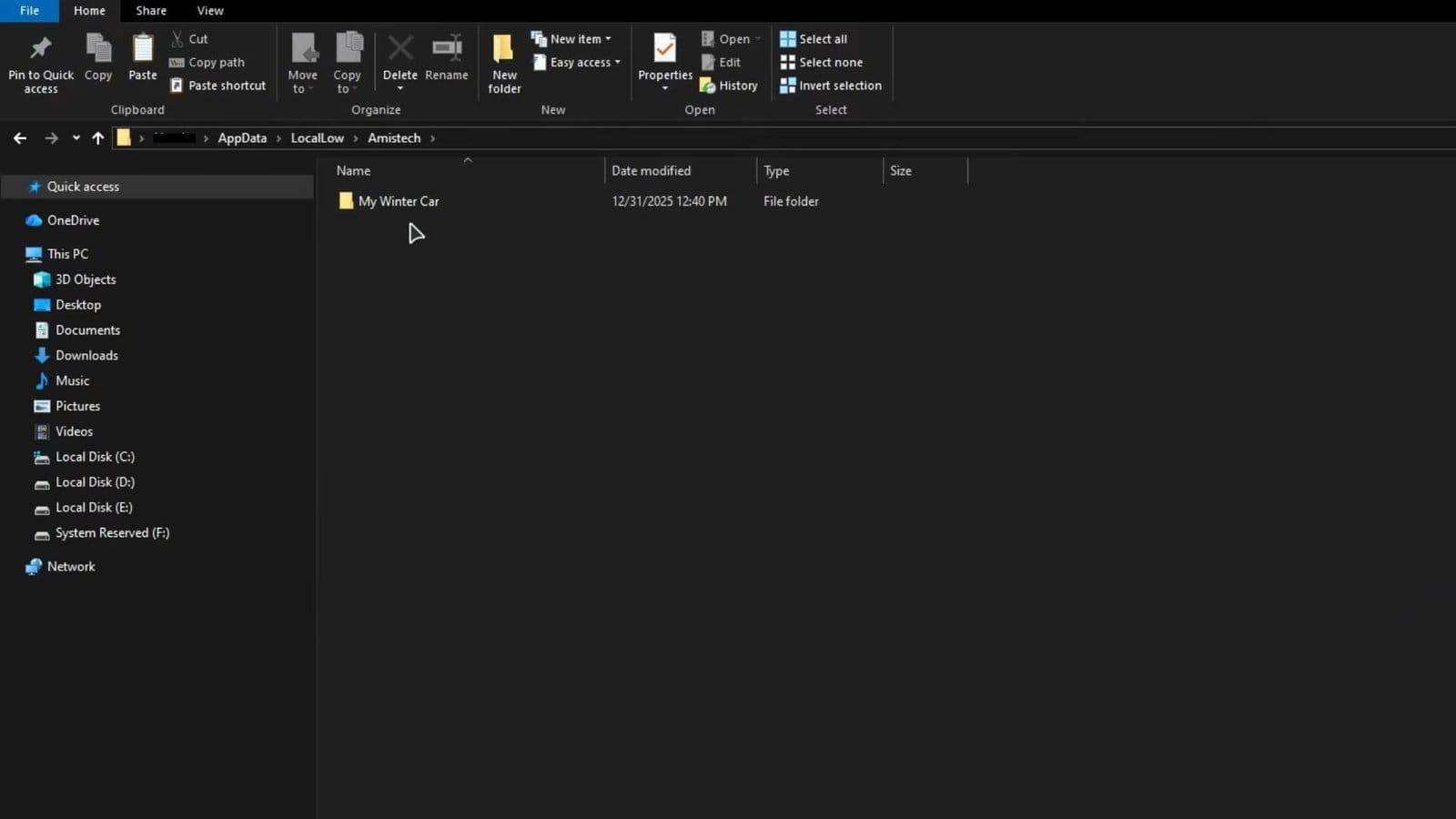
    Save File Location My Winter Car

    To access the game’s save folder, press Windows+R to bring up the Run command. Type in %appdata% in the Run bar and press Enter. Once you are here, select the LocalLow folder and locate the Amistech folder. Double-click it, then find the My Winter Car folder. Copy the folder and paste it into another location to create a backup.

    How to Import My Summer Car to My Winter Car

    • Head over to C:\Users\(USERNAME)\AppData\LocalLow\Amistech
    • Find the My Summer Car folder and double-click on it.
    • Copy the defaultES2File.txt here.
    • Go back and double-click on the My Winter Car folder.
    • Paste the file here, then launch the game.
    • In case this doesn’t work, rename the defaultES2File.txt to savefile.txt within your My Winter Car game folder.

    Read More: My Winter Car – ATM and Banks Explained

    FAQs

    Can I import the MSC save file to MWC?

    Yes, there is a way to import your My Summer Car save file to My Winter Car by copying and pasting the defaultES2File.txt into the My Winter Car folder.

    Do I need to restart my system for the changes to work?

    Yes, it is recommended to restart once you transfer the required files to the My Winter Car folder.

    What carries over from the MSC save file to MWC?

    Items like marker lights, radio, and the computer get carried over to My Winter Car.

    Is creating a backup save file necessary?

    Yes, in case you wish to make huge changes to the game file, it is always recommended to create a backup save to lean back on if things don’t work out.

    My Winter Car
    Share. Facebook Twitter Bluesky Reddit WhatsApp Copy Link
    Avatar photo
    Kirthana K
    • Website
    • LinkedIn

    Her lifelong passion of gaming led her to writing about them, bringing words to life and compiling comprehensive game guides that are quick and easy to follow. If not writing, you can catch her exploring Teyvat or the Palpagos Islands.

    Related Posts

    Neverness to Everness – Where to Use Oracle Stone

    April 30, 2026

    Neverness to Everness – How to Switch MC’s Gender

    April 30, 2026

    Neverness To Everness (NTE) Bug Fix – Infinite Loading Screen 100%

    April 30, 2026

    Neverness to Everness – How to Unlock the Blue Flame Bike

    April 29, 2026

    Far Far West – All Correct Answers to Rules of the West Quiz

    April 29, 2026

    ARC Raiders – How to Use Dockmaster’s Detector

    April 28, 2026
    EDITOR'S PICKS

    Neverness to Everness – Where to Use Oracle Stone

    April 30, 2026

    Neverness to Everness – How to Switch MC’s Gender

    April 30, 2026

    Neverness To Everness (NTE) Bug Fix – Infinite Loading Screen 100%

    April 30, 2026

    Neverness to Everness – How to Unlock the Blue Flame Bike

    April 29, 2026
    DON'T MISS
    Guides

    Hytale – How To Summon Skeletons

    Kirthana K
    Guides

    Hytale – How to Open & Use the Map

    Jordan Blake
    Guides

    WoW Midnight – How to Get the Nether-Warped Drake Mount

    Kirthana K
    Guides

    Crime Scene Cleaner Act 2 – How to Solve the Amber Alert Keg Puzzle

    Kirthana K
    Guides

    BO7 Zombies Astro Malorum – All 10 Bobblehead Locations

    Santosh Panda
    Guides

    Roadside Research – How to Get on the Roof

    Kirthana K
    Guides

    Nioh 3 – How to Open Mikatagahara Junction Locked Gate

    Kirthana K
    Guides

    Diablo 4 Season 12 – How to Farm Meaty Offerings

    Kirthana K
    Guides

    Pokémon Pokopia – How To Change Appearance

    Kirthana K
    Guides

    RE9 – Level 3 ID Wristband Location

    Sagnik Adhikary
    © 2026 TheGamesWatch
    • Home
    • Our Authors
    • About Us
    • Privacy Policy

    Type above and press Enter to search. Press Esc to cancel.

    We use cookies to ensure that we give you the best experience on our website. If you continue to use this site we will assume that you are happy with it.