

Key Points
- Earlier, you had to use mods to create a multiplayer lobby for Waterpark Simulator.
- Now, you have the option to play multiplayer by creating a lobby and inviting friends.
- You can invite up to 2-6 people to play at a time.
Now you can manage your park more efficiently with your friends in the Waterpark Simulator. With the new Multiplayer option, you can invite up to 6 friends to help you manage the park. On top of that, with all your staff combined, you can easily tackle all the challenges that you find in the park.
Waterpark Simulator – Co-Op Overview
| Max players | 6 |
| Private lobbies available? | Yes |
| Public lobbies available? | Yes |
How to Create Multiplayer Lobbies
I find playing multiplayer is a great way to assign actual players to take over tasks if I don’t have any staff at hand. This really helped me maintain my park and increase the customer satisfaction levels.
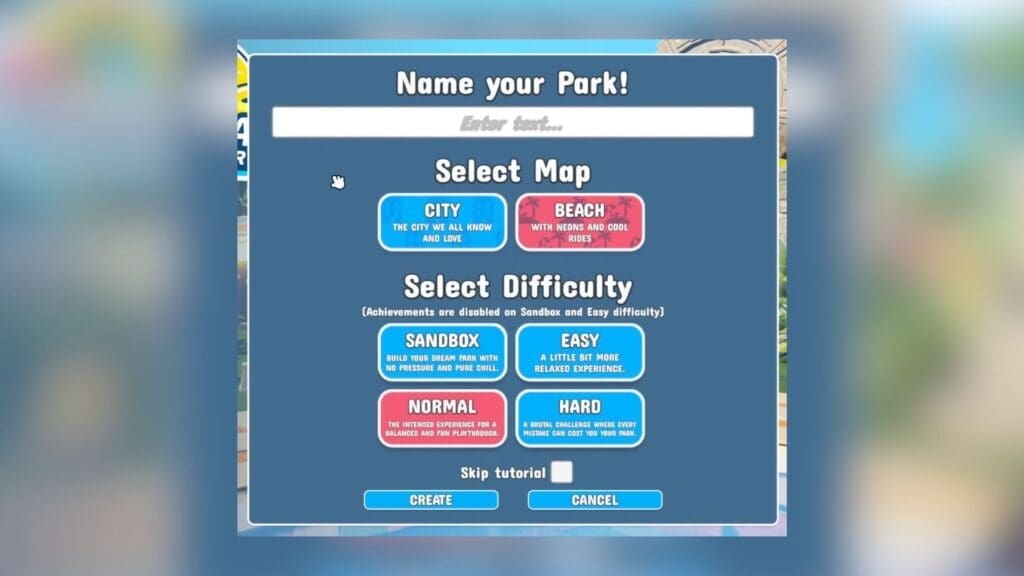
To create a lobby, as soon as you log into the game, you will find the Multiplayer option in the main menu. Select it, and you will find two options: Host or Join. If you plan to host, you can either create a new world or open up your existing world.
If picking a new world, you can customize it by picking your map, difficulty level, and naming your new world. The difficulty levels you get are:
- Sandbox: Build your park without any restrictions.
- Easy: A relaxing experience with minimal restrictions.
- Normal: A balanced playthrough with certain challenges but overall enjoyable.
- Hard: A challenging approach that will count all your mistakes and jeopardize your park.
You can also choose to skip the tutorial if you and your friends have played the game before by checking or unchecking the Skip Tutorial box at the bottom of the menu. Once you are set, hit the Create button to be taken to the next menu.
Public, Friends, or Invite Only Lobbies
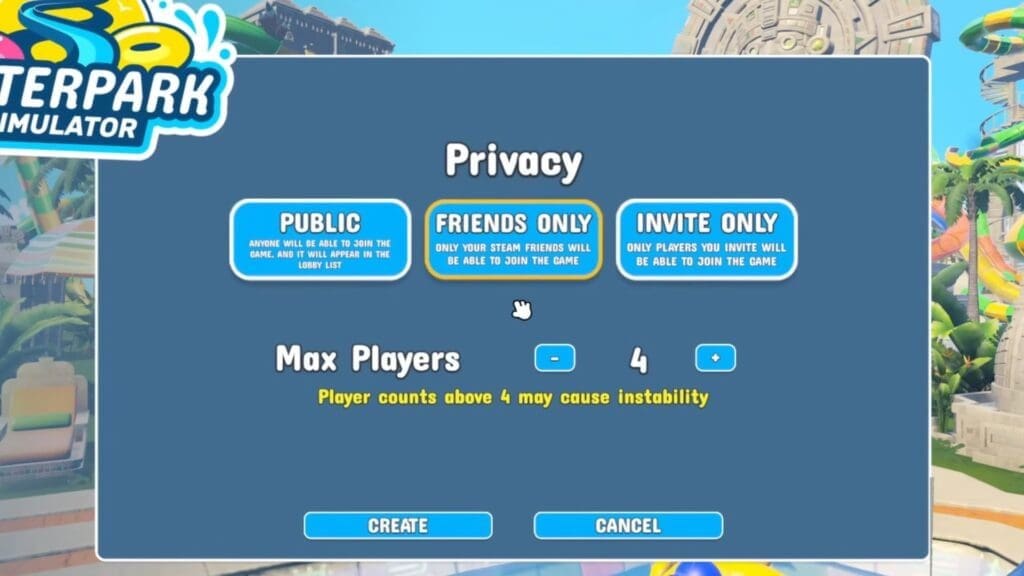
Over here, you get to choose between three more lobby options: Public Lobby, Friends Only, and Invite Only. Here’s what each option does:
- Public Lobby: Makes your game available for all players to view in the Join menu.
- Friends Only: Only your Steam friends can view and join the lobby.
- Invite Only: Sending a unique invite code to selected friends will make them join your lobby.
Once you have picked your preferred option, hit the Confirm button to play the game. If you have picked the Friends Only option, your Steam friends get to see your lobby when they hit the Join option in-game. Invite Only friends will directly join your lobby without checking.
How to Join Lobbies
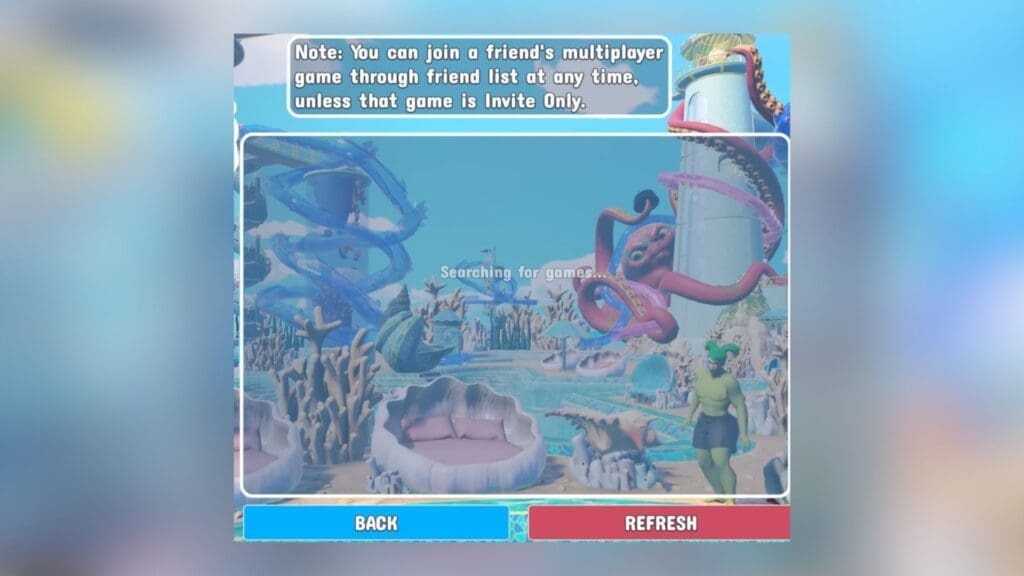
Joining lobbies is far easier, as all you need to do is select the Join option after selecting Multiplayer in the main menu. You can scroll through all available public lobbies here and select the one you want. If your friend is hosting a Friends Only lobby, you can find their lobby in the list and select it to join. You can also hit the Refresh option to change the lobby list and get a new set.
FAQs
Is playing with 6 players recommended?
While picking the number of players to join your lobby, you do get a warning that the game might become unstable if you add more players. Hence, the recommended player count is actually 4 and not 6 to avoid this problem.
How do I password protect my lobby?
There is no option to apply a password to your lobby, but you can choose the Invite Only option to keep your lobby private.
I can’t find my friend’s lobby in the Join menu, what do I do?
Refresh the list to find the lobby, or ask your friend to create another lobby, as it could have timed out.
