
Close Menu

    Subscribe to Updates

    Get the latest creative news from FooBar about art, design and business.

    What's Hot

    Dragon Ball Sparking Zero NEO DLC – What If Yamcha Destroyed Android 19 and 20

    July 30, 2026

    Dragon Ball Sparking Zero NEO DLC – What If Yamcha Won The Cell Games

    July 30, 2026

    Dragon Ball Sparking Zero NEO DLC – What If Tien Went to Namek to Defeat Frieza

    July 30, 2026
    Facebook X (Twitter) Instagram
    TheGamesWatchTheGamesWatch
    • Guides
    • Features
    • Game Hubs
    TheGamesWatchTheGamesWatch
    Home»Guides»Burglin’ Gnomes – How to Use the Blender
    Guides

    Burglin’ Gnomes – How to Use the Blender

    By Kirthana KJune 13, 20263 Mins Read

    ​Key Points​

    • You will get a task objective to use the blender and blend things in it.
    • The blender is always located in the kitchen, and is usually found in the lower cabinets.
    • After pulling the blender out, turn the dial at the base of the blender to use it.

    With each round you enter in Burglin’ Gnomes, you will get different tasks to complete on the list. If you have the blender task on your list, then you need to know the right way to handle this dangerous tool.​

    Read More: Burglin’ Gnomes – How to Find Jonathan

    Burglin’ Gnomes – Blender Overview​

    LocationLower kitchen cabinets
    How to usePress the black dial to power it
    Task difficulty levelMedium

    Where to Find the Blender​

    Image via TheGamesWatch

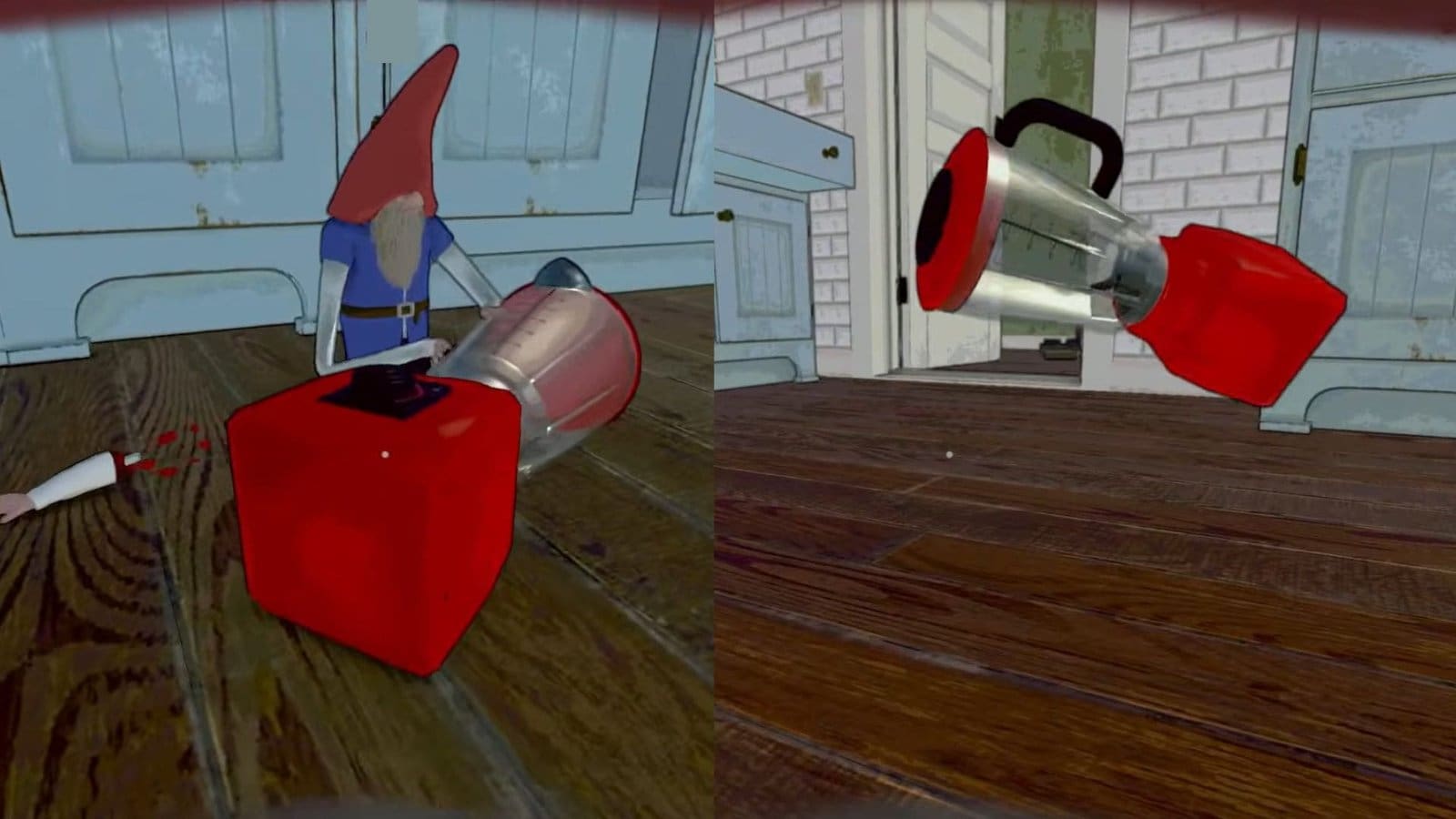
    Like most kitchen appliances, you will find the blender in the kitchen. At first, the blender isn’t visible as it isn’t placed on the kitchen counter. Rather, you need to pull open the cabinets to find the blender within. Be careful while opening the cabinets, as I had a rat or two jump out at me and lower my health. The blender isn’t found in the upper cabinets and is only found in the lower cabinets.​

    How to Put Something in the Blender​

    You will need the blender if you have the above task objective on your To-Do list. Once you find the blender, you need to be very careful with it. Do not touch the black dial at the base of the blender yet, as this could turn it on. Then, carefully push the blender out of the cabinet and onto the floor.

    ​It doesn’t matter if the blender gets lopsided and falls, as it will still work. Then, turn the black power dial and watch the inner blades spin. You need to toss 7 items into the blender for the task to be completed, so run around and find any random item to put in there. I liked to roll the blender under the cabinets where the rats are and kill them.

    ​Tips to Use the Blender​

    Image via TheGamesWatch

    The blender is a powerful and dangerous item, similar to all weapons in the game. While bringing the blender down, make sure you don’t have your hands on the dial or the glass, as you can accidentally slice them off. Keep your hands on the body or the cap of the blender and push it down.

    ​Even after turning it on, step away from the glass and only push or pull the blender via the lower body. While tossing items into the blender, make sure you don’t stand too close to it, and hover your arms over the blade while tossing items inside. ​

    Read More: Burglin’ Gnomes – Best Places to Hide

    FAQs​

    I can’t put items in the blender. What do I do?​

    In case you have the blender turned on and can’t add items, then try breaking the glass part of the blender and tossing items into the blade instead.

    ​How do I complete the Get the Blender task?​

    If you get the objective to collect the blender, then you need to carefully drag the blender out of the main door or toss the parts of the blender out of the window.​

    Can I kill enemies with the blender?​

    Yes, break the glass part of the blender and turn it on. Then grab the blender at the base and toss it at enemies to kill them.

    Burglin' Gnomes
    Share. Facebook Twitter Bluesky Reddit WhatsApp Copy Link
    Avatar photo
    Kirthana K
    • Website
    • LinkedIn

    Her lifelong passion of gaming led her to writing about them, bringing words to life and compiling comprehensive game guides that are quick and easy to follow. If not writing, you can catch her exploring Teyvat or the Palpagos Islands.

    Related Posts

    Dragon Ball Sparking Zero NEO DLC – What If Yamcha Destroyed Android 19 and 20

    July 30, 2026

    Dragon Ball Sparking Zero NEO DLC – What If Yamcha Won The Cell Games

    July 30, 2026

    Dragon Ball Sparking Zero NEO DLC – What If Tien Went to Namek to Defeat Frieza

    July 30, 2026

    Seven Deadly Sins Origin – How to Cook a Protein Bug Skewer

    July 16, 2026

    Seven Deadly Sins Origin – How to Get the Domesticated Wind Spirit

    July 16, 2026

    Seven Deadly Sins Origin – All Liones Northern Front Hidden Quests

    July 16, 2026
    EDITOR'S PICKS

    Dragon Ball Sparking Zero NEO DLC – What If Yamcha Destroyed Android 19 and 20

    July 30, 2026

    Dragon Ball Sparking Zero NEO DLC – What If Yamcha Won The Cell Games

    July 30, 2026

    Dragon Ball Sparking Zero NEO DLC – What If Tien Went to Namek to Defeat Frieza

    July 30, 2026

    Windrose Guides Hub

    July 27, 2026
    DON'T MISS
    Guides

    Romestead – How to Make Flour and Bread

    Kirthana K
    Features

    5 Indie Games To Watch Out For In Nov 2025

    Santosh Panda
    Guides

    Pokémon Pokopia – How to Make Bricks

    Kirthana K
    Guides

    Pokopia – How to Move Pokémon to Different Habitats

    Kirthana K
    Guides

    Tomodachi Life: Living the Dream – All Ponderings and Solutions

    Kirthana K
    Guides

    Sailor Piece Roblox – How To Get Anti-Magic

    Sagnik Adhikary
    Guides

    Windrose – How to Beat Enemy Ships

    Kirthana K
    Guides

    Road to Vostok – How to Navigate the Minefield

    Kirthana K
    Guides

    Tomodachi Life: Living The Dream – How to Get Pets

    Kirthana K
    Guides

    WoW Midnight – Incomplete Book of Sonnets Guide

    Kirthana K
    © 2026 TheGamesWatch
    • Home
    • Our Authors
    • About Us
    • Privacy Policy

    Type above and press Enter to search. Press Esc to cancel.

    We use cookies to ensure that we give you the best experience on our website. If you continue to use this site we will assume that you are happy with it.