Close Menu

    Subscribe to Updates

    Get the latest creative news from FooBar about art, design and business.

    What's Hot

    Crimson Desert – All 13 Constellation Locations & Solutions

    April 9, 2026

    Disney Dreamlight Valley – How to Get Pocahontas​

    April 9, 2026

    Pokémon Champions – How to Recruit More Pokémon ​

    April 8, 2026
    Facebook X (Twitter) Instagram
    TheGamesWatchTheGamesWatch
    • Guides
    • Features
    TheGamesWatchTheGamesWatch
    Home»Guides»Windrose – Multiplayer and Co-Op Guide
    Guides

    Windrose – Multiplayer and Co-Op Guide

    By Kirthana KFebruary 22, 20263 Mins Read

    ​Key Points​

    • The co-op lobbies support a maximum of 4 players.
    • Solo and offline modes are also available.
    • Customization of co-op lobbies is also available.

    You will require the help of your friends as you play Windrose and navigate the seas. The game does offer the option to become a host or join a server and play with friends. Loading into the multiplayer screen is not mentioned during the game’s tutorials, so this is something you have to figure out on your own. ​

    Read More: Windrose – How to Fast Travel

    Windrose – Multiplayer and Co-Op Overview

    Co-op lobby availabilityYes
    Max players4
    Lobby customization availabilityYes
    How to invite/joinCode, Steam invites

    ​How to Host Co-Op Multiplayer Lobby​

    • Once you load into the game, select the Play option.
    • You will get three options. Choose the Host a Game option from the menu.
    • Click on Create a New World, or select any existing World.
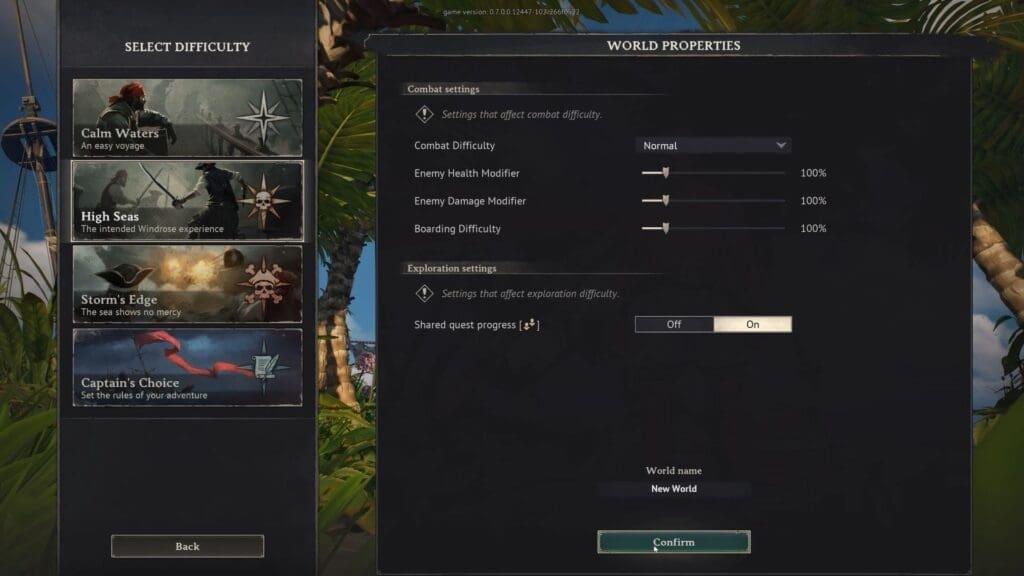
    • In the new screen, you get to customize how you want to play in your lobby.
    • Customization options include combat difficulty, World difficulty, and exploration settings.
    • Enter your World name at the bottom of the screen and click Confirm to save changes.
    • You will get a unique code that you get to share with your friends.
    • If you wish, you can set a password for your lobby to make it secure. Be sure to share the password with your friends, too.
    • You can also press Shift+Tab to open up the Steam friend list and select friends from there to directly invite them.

    How to Join Lobbies​

    If you have a code or invite from your friend, you get to join their servers directly. Using the code, head over to the game’s main menu and click the Play option. Select the Connect to Server option and input your invite code. You can also select your recently played lobby from the Recent list right below the invite code input area. If you have received a Steam invite, then you get to accept it from your invite list once you are online. ​

    Read More: Windrose – How to Get a Ship

    FAQs​

    Can I play solo?​

    Yes, select the Solo/Offline option from the game’s main menu to play solo.​

    Can I create a new character for the co-op lobby?​

    Yes, in the game’s main menu, click on the Change Character option under your character to make a new one. Select your new character while joining or creating your co-op lobby.​

    Will my character progress get carried over between Worlds?​

    Yes, if you choose to play with a single character, your progress does get carried over between Worlds.

    ​

    Windrose
    Share. Facebook Twitter Bluesky Reddit WhatsApp Copy Link
    Avatar photo
    Kirthana K
    • Website
    • LinkedIn

    Her lifelong passion of gaming led her to writing about them, bringing words to life and compiling comprehensive game guides that are quick and easy to follow. If not writing, you can catch her exploring Teyvat or the Palpagos Islands.

    Related Posts

    Crimson Desert – All 13 Constellation Locations & Solutions

    April 9, 2026

    Disney Dreamlight Valley – How to Get Pocahontas​

    April 9, 2026

    Pokémon Champions – How to Recruit More Pokémon ​

    April 8, 2026

    Pokémon Champions – How to Transfer Pokémon Between Champions & Pokémon Home

    April 8, 2026

    Starfield Terran Armada Mission – How To Start The SSNN Broadcast 

    April 8, 2026

    Crimson Desert – All Tommaso Questions Answers (Harvest of Greed Quest)

    April 8, 2026
    EDITOR'S PICKS

    Crimson Desert – All 13 Constellation Locations & Solutions

    April 9, 2026

    Disney Dreamlight Valley – How to Get Pocahontas​

    April 9, 2026

    Pokémon Champions – How to Recruit More Pokémon ​

    April 8, 2026

    Pokémon Champions – How to Transfer Pokémon Between Champions & Pokémon Home

    April 8, 2026
    DON'T MISS
    Guides

    HumanitZ – How to Treat Bleeding, Infection & Sickness

    Santosh Panda
    Guides

    Code Violet – How To Open the Locked Door in Communications Facility

    Jordan Blake
    Guides

    Crimson Desert – Righteous Verdict Weapon Location

    Kirthana K
    Guides

    Seven Deadly Sins: Origin – How To Capture Dusk Bison

    Sagnik Adhikary
    Guides

    Code Vein 2 – Josee’s Fading Bond Guide

    Kirthana K
    Guides

    Hytale – How To Unlock Memories

    Jordan Blake
    Guides

    Dragon Quest VII Reimagined – How to get the Magic Carpet

    Kirthana K
    Guides

    Poppy Playtime Chapter 5 – Engineering Workshop Puzzle Guide

    Kirthana K
    Guides

    YAPYAP – How to Play Online Co-Op

    Kirthana K
    Guides

    Nioh 3 – How To Claim Pre-Order Bonuses

    Sagnik Adhikary
    © 2026 TheGamesWatch
    • Home
    • Our Authors
    • About Us
    • Privacy Policy

    Type above and press Enter to search. Press Esc to cancel.

    We use cookies to ensure that we give you the best experience on our website. If you continue to use this site we will assume that you are happy with it.