

Key Points
- There is controller support to play Windrose.
- You can use the controller in wired or unwired mode.
- Controller keybinds cannot be changed.
If you are looking for a more efficient way to navigate the islands and seas of Windrose, then using a controller would make navigation much easier. With that said, choosing to play with a controller does have its perks, but it also comes with a few downsides.
Read More: Windrose – All Ingots and How to Get
Is There Controller Support For Windrose
Yes, there is controller support for Windrose, and you can use either the Dualsense or Xbox controllers to play the game. For a better gameplay experience, it is best to set up your choice of controller with a wired cable attached to your gaming system.
If you wish to play wireless instead, then I found using the Xbox controller provided a more engaging experience than using the Dualsense. The DualSense’s haptic feedback works flawlessly while wired, but the same effect can’t be achieved if used wirelessly. The Xbox controller, on the other hand, works with and without, and provides a seamless gaming experience. Whichever controller you grab onto, both are supported by the game.
Can Controller Keybinds be Changed
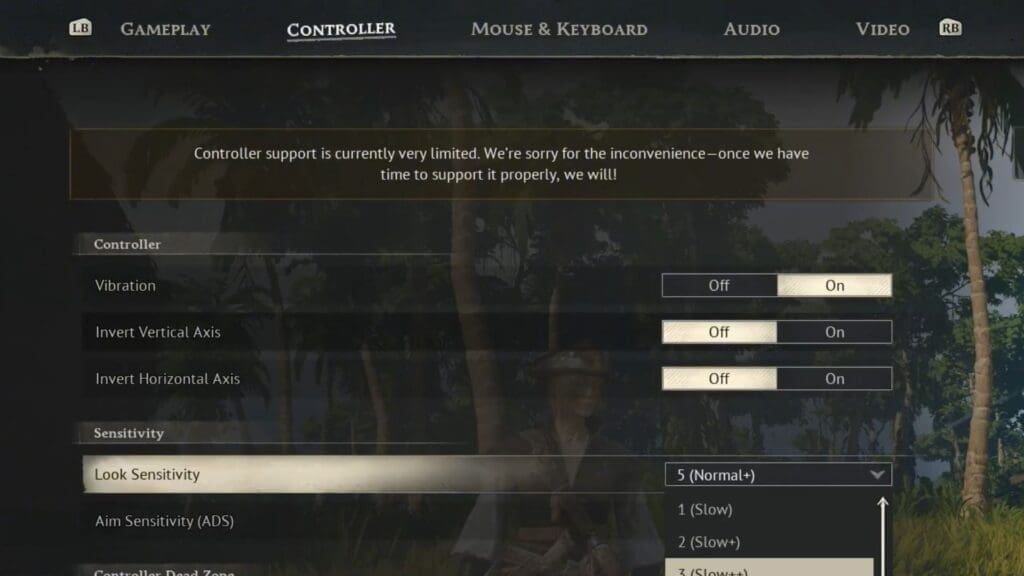
Unfortunately, Windrose does not support changing controller keybinds yet. Since the game is still in Early Access, a lot of the game’s core features are missing. It is unclear if they will be added later on as more features are uncovered. Since changing keybinds would be a low-priority feature, it could take several updates before this system is implemented in the game.
If this seems like a dealbreaker to you, then your next best option is to opt for a mouse and keyboard. Windrose has a dedicated rebind section for mouse and keyboard control. To find this option, head over to the Settings option in the main menu and select the Mouse and Keyboard option. Scroll through the options available on the list to have it changed to your preferred key.
Controller Keybind List
Below is the list of all assigned keys and buttons for the controller and what they do in the game.
| Action | Dualsense | Xbox |
| Move | Left Stick | Left Stick |
| Aim | L2 | LT |
| Block | L1 | LB |
| Remove Weapon | Options (hold) | Menu (hold) |
| Light Attack | R1 | RB |
| Heavy Attack | R2 | RT |
| Special Attack | L1 + R1 | LB + RB |
| Reload | Triangle | Y |
| Sprint | L3 (press) | Left Stick (press) |
| Long sprint | Circle (hold) | B (hold) |
| Dash | Circle | B |
| Jump | Cross (X) | A |
| Game Menu | Options (tap) | Menu (tap) |
| Inventory | Touchpad (tap) | View (tap) |
| Open Map | Touchpad (hold) | View (hold) |
| Interaction | Square | X |
| Secondary Interaction | Square (hold) | X (hold) |
| Switch Action Slots | Triangle (hold) | Y (hold) |
| Look | Right Stick | Right Stick |
| Target Lock | R3 | Right Stick (press) |
| Use Item 1 | D-pad Up | D-pad Up |
| Use Item 2 | D-pad Right | D-pad Right |
| Use Item 3 | D-pad Down | D-pad Down |
| Use Item 4 | D-pad Left | D-pad Left |
Read More: Windrose – How To Skip Time
FAQs
Is the controller better than the mouse and keyboard?
It depends on your personal playstyle. If you are used to either of the two options, then sticking to them will make your gameplay experience more enjoyable.
What options can I rebind for the controller?
The only options you can change for the controller settings are inverting X and Y axes, changing deadzones, and changing sensitivity.
My controller bugs out whenever I use it. What do I do?
If using wirelessly, then unpair and re-pair the controller to your system and try again. If your controller still crashes, then using a wired cable will be your next best option.
