Close Menu

    Subscribe to Updates

    Get the latest creative news from FooBar about art, design and business.

    What's Hot

    How To Reduce Stress in Project Zomboid

    October 22, 2026

    How To Reload Guns in Project Zomboid

    October 22, 2026

    How To Switch Car Batteries in Project Zomboid

    October 21, 2026
    Facebook X (Twitter) Instagram
    TheGamesWatchTheGamesWatch
    • Guides
    • Features
    • Game Hubs
    TheGamesWatchTheGamesWatch
    Home»Guides»How To Switch Car Batteries in Project Zomboid
    Guides

    How To Switch Car Batteries in Project Zomboid

    By Kirthana KOctober 21, 20263 Mins Read

    ​Key Points​

    • Switching out a bad car battery with a working one will help you get around in your car better.
    • You can find random car batteries inside unused cars and test them out for their usability.
    • Charging your existing car battery will also help improve it and make it usable.

    Besides getting around on foot in Project Zomboid, you can find cars to help you get around. But some cars might not be in a functioning state, and if the batteries are to blame, then those could be switched out. Looking for a working car battery will take a while, and you also need to learn how to switch out the old battery with the new one.

    Read More: How To Wash Clothes in Project Zomboid

    ​Project Zomboid – Car Battery Overview​

    How to getFrom abandoned cars
    How to switchPress the E key while near the car hood
    How to chargeCar battery charger

    ​How to Find Car Batteries

    Image via TheGamesWatch

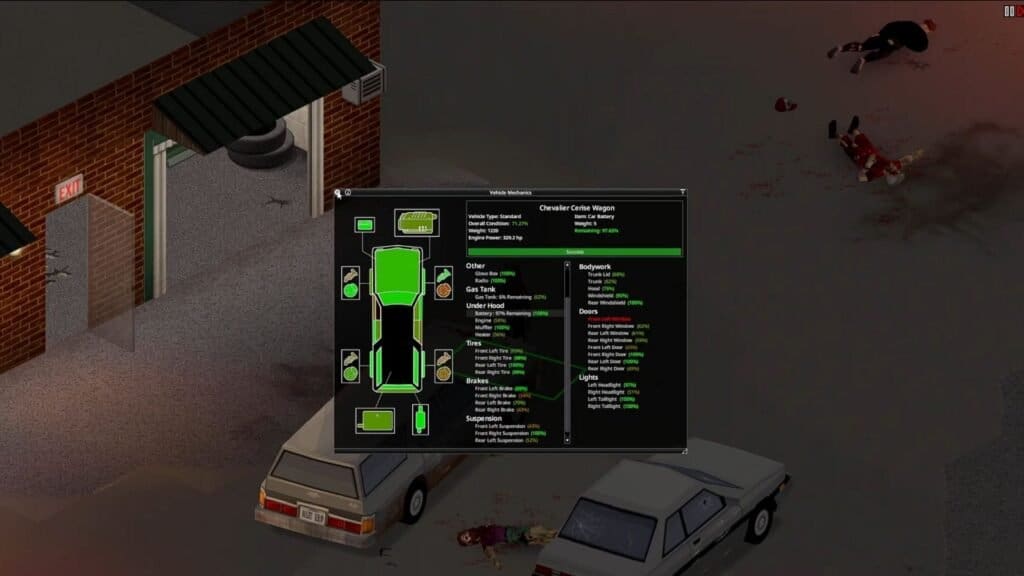
    ​Car batteries are mostly looted off of other cars in the overworld, so you need to search for abandoned cars during your exploration. After finding a suitable car, walk up to it and press the E key to interact with the car parts. You can then right-click the car battery in the vehicle mechanics menu and press the remove button here. Your new car battery will be stored in your inventory for further use.

    ​How to Charge a Car Battery

    ​To charge a car battery, you need to find a car battery charger. Car battery chargers are extremely rare spawns that can be found inside garages and auto mechanic stores. If you are in a garage or store, keep checking around the room until you find a large grey box-like object. You need to hook up this item to a working power grid or generator to help it charge up the battery.

    ​Next, put the battery down and connect it to the charger, then wait for it to get completely charged. It could take a while, so you need to let it stay in a secluded place until you can come back for it. Also, if your car battery is at 0%, then it might despawn if you set it down. Make sure there is still some juice left in it before charging it up.

    ​How to Change Car Battery

    ​Now, you need to put the new battery in your chosen car to make it work. To do that, stand in front of the car you wish to use and press the E key. This will again bring up the vehicle mechanics menu. Make sure that the battery you wish to use is in your inventory, then select the battery slot in the car menu. Select the option to Install, then select the car battery. If you have successfully installed a working battery, then your car should start up and become usable again.

    ​FAQs

    ​How long will it take to charge a car battery?

    ​It could take a few in-game hours or days to completely charge a car battery, depending on how low of a charge it initially had.

    ​Can I change other car parts this way?

    ​Yes, you can change any car part by interacting with it, as long as you have a working spare part to use here.

    ​My car broke down midway, and I can’t find any replacement. What do I do?

    ​The best thing you can do if your car breaks down is to get around on foot for the time being and take shelter inside houses to protect yourself.

    Project Zomboid
    Share. Facebook Twitter Bluesky Reddit WhatsApp Copy Link
    Avatar photo
    Kirthana K
    • Website
    • LinkedIn

    Her lifelong passion of gaming led her to writing about them, bringing words to life and compiling comprehensive game guides that are quick and easy to follow. If not writing, you can catch her exploring Teyvat or the Palpagos Islands.

    Related Posts

    How To Reduce Stress in Project Zomboid

    October 22, 2026

    How To Reload Guns in Project Zomboid

    October 22, 2026

    How To Wash Clothes in Project Zomboid

    October 21, 2026

    How To Craft Bandages in Project Zomboid

    October 21, 2026

    Where To Find Gourgeist and Pumpkaboo in Pokopia

    October 17, 2026

    How to Customize and Move Homes in Hello Kitty Island Adventure

    October 13, 2026
    EDITOR'S PICKS

    How To Reduce Stress in Project Zomboid

    October 22, 2026

    How To Reload Guns in Project Zomboid

    October 22, 2026

    How To Switch Car Batteries in Project Zomboid

    October 21, 2026

    How To Wash Clothes in Project Zomboid

    October 21, 2026
    DON'T MISS
    Guides

    Tomodachi Life: Living the Dream – All Ponderings and Solutions

    Kirthana K
    Guides

    Where Winds Meet – Deep Pond of Pear Blossoms Wandering Tale

    Amar Deogaonkar
    Guides

    Spring Festival Guide In Fields of Mistria

    Kirthana K
    Guides

    BO7 Zombies Ashes of the Damned – All 10 Bobblehead Locations

    Santosh Panda
    Guides

    Windrose – How to Get a Ship

    Kirthana K
    Guides

    Where Winds Meet – How to Get the Moon Dance Emote

    Kirthana K
    Guides

    Early Essential Tips to Help You Survive in HumanitZ

    Santosh Panda
    Guides

    Crimson Desert – Dragon’s Stone Chamber Puzzle Solution

    Kirthana K
    Guides

    Arknights Endfield Rally and Unite Quest – Floating Crates Puzzle Solution

    Rishabh Bhatnagar
    Guides

    Crisol – All Sea Mechanism Puzzle Solutions

    Kirthana K
    © 2026 TheGamesWatch
    • Home
    • Our Authors
    • About Us
    • Privacy Policy

    Type above and press Enter to search. Press Esc to cancel.

    We use cookies to ensure that we give you the best experience on our website. If you continue to use this site we will assume that you are happy with it.