Close Menu

    Subscribe to Updates

    Get the latest creative news from FooBar about art, design and business.

    What's Hot

    Neverness To Everness (NTE) Bug Fix – Infinite Loading Screen 100%

    April 30, 2026

    Neverness to Everness – How to Unlock the Blue Flame Bike

    April 29, 2026

    Far Far West – All Correct Answers to Rules of the West Quiz

    April 29, 2026
    Facebook X (Twitter) Instagram
    TheGamesWatchTheGamesWatch
    • Guides
    • Features
    TheGamesWatchTheGamesWatch
    Home»Guides»Neverness To Everness (NTE) Bug Fix – Infinite Loading Screen 100%
    neverness to everness tomato demon boss bug
    Image via TheGamesWatch
    Guides

    Neverness To Everness (NTE) Bug Fix – Infinite Loading Screen 100%

    By Kirthana KApril 30, 20263 Mins Read

    ​Key Points

    • The Tomato Jelly Rampage mission is currently bugged on PlayStation.
    • After the boss fight cutscene, players are stuck in an infinite loading screen.
    • A patch update to fix this issue will be released soon, but until then, there are other ways to resolve it.

    Like most RPGs, Neverness to Everness does come with a handful of bugs. But none are as annoying as the infinite loading screen bug during the Tomato Jelly Rampage mission. This bug completely locks players out of progressing through the rest of the game, and there isn’t a lot that can be done about it right now.​

    Read More: Neverness to Everness – How to Unlock the Blue Flame Bike

    How to Fix the Infinite Loading Screen in Neverness to Everness​

    Unfortunately for PS players, there seems to be a huge bug where the game enters an infinite loading screen during the Tomato Jelly Rampage Live Report mission. During the cutscene after defeating the Tomato Devil boss, the game gets stuck. The devs have acknowledged the bug and will release a patch update soon. But until then, there are a few things that I tried to get the game up and running again.​

    Fix #1​

    Image via TheGamesWatch

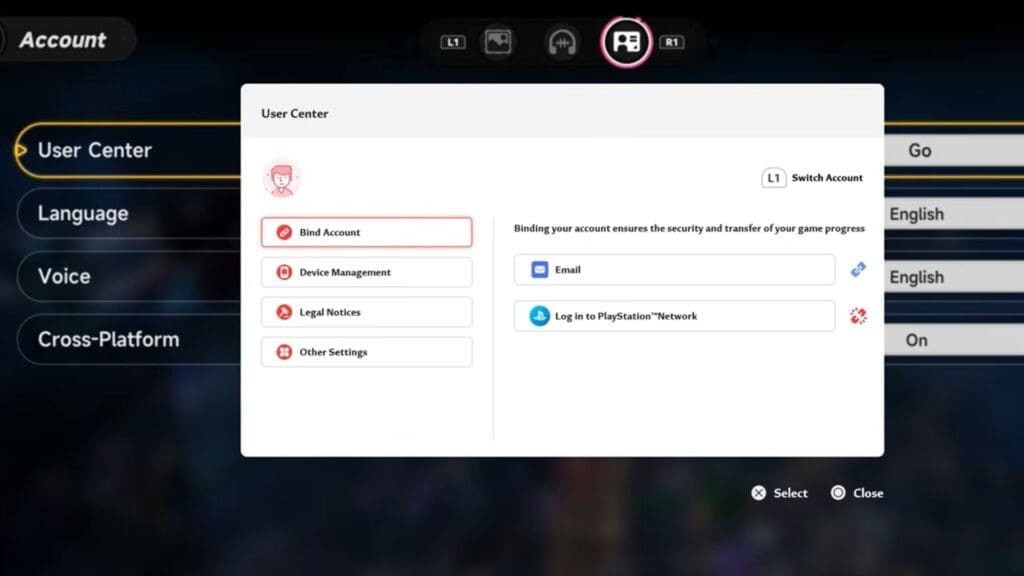
    One method is to install the game on another device, such as a mobile or PC. Next, link your PS in-game profile to an email address by accessing the NTE main menu and selecting User Center in account settings. ​

    After linking your profile, use the same email to log in on the other device. Resume your progress and complete the mission, then log back into your PS profile. This skips the problematic cutscene and allows you to continue playing.

    ​Fix #2​

    If that didn’t work, some players reported waiting a few minutes on the loading screen first. After that, check the internet connection within the PSN settings, then load back into the game. This will send you to the login screen once again, helping you progress through the game normally. ​

    Fix #3​

    If the above fixes don’t work, you could try the following steps to make the game run again.

    • Restarting the system and loading back in.
    • Uninstall and reinstall the game.
    • Change the internet network or use an Ethernet cable.
    • Perform a power restart on the PS and try loading the game.

    FAQs​

    Is this bug exclusive to PS players?​

    Yes, this bug does not occur while playing on mobile or PC, and it only appears during this particular mission.​

    When will the patch update be released?

    According to the dev notes, there should be a patch update soon, so keep checking for updates frequently and get the latest version of the game to bypass the bug.​

    Is there any way to skip this mission?​

    If you haven’t picked up this mission yet or haven’t reached the boss fight, you could wait around for the patch update before continuing forward. Try completing other quests for the time being before coming back here.

    ​

    Neverness to Everness
    Share. Facebook Twitter Bluesky Reddit WhatsApp Copy Link
    Avatar photo
    Kirthana K
    • Website
    • LinkedIn

    Her lifelong passion of gaming led her to writing about them, bringing words to life and compiling comprehensive game guides that are quick and easy to follow. If not writing, you can catch her exploring Teyvat or the Palpagos Islands.

    Related Posts

    Neverness to Everness – How to Unlock the Blue Flame Bike

    April 29, 2026

    Far Far West – All Correct Answers to Rules of the West Quiz

    April 29, 2026

    ARC Raiders – How to Use Dockmaster’s Detector

    April 28, 2026

    ARC Raiders – Line In The Sand Quest Guide

    April 28, 2026

    ARC Raiders Last Resort Guide – Where To Find Ship Models

    April 28, 2026

    ARC Raiders Avian Alarm Project – All Requirements & Rewards

    April 28, 2026
    EDITOR'S PICKS

    Neverness To Everness (NTE) Bug Fix – Infinite Loading Screen 100%

    April 30, 2026

    Neverness to Everness – How to Unlock the Blue Flame Bike

    April 29, 2026

    Far Far West – All Correct Answers to Rules of the West Quiz

    April 29, 2026

    ARC Raiders – How to Use Dockmaster’s Detector

    April 28, 2026
    DON'T MISS
    Guides

    Avatar From the Ashes DLC – How To Get Battle of Ayram Alusing Armor

    Kirthana K
    Guides

    Crimson Desert – How to craft Kuku Bismuth Spear

    Jordan Blake
    Guides

    Icarus Dangerous Horizons – How To Craft Uranium Ingot and Deliver Rod Exotics

    Jordan Blake
    Guides

    Where Winds Meet – Governor’s Residence All Antique Locations

    Jordan Blake
    Guides

    RuneScape Dragon Wilds: How To Unlock Fishing

    Kirthana K
    Guides

    Esoteric Ebb – Sphinx Riddle Correct Answer

    Sagnik Adhikary
    Guides

    Where Winds Meet – The Rat in the Buddha Fort Wandering Tales Guide

    Kirthana K
    Guides

    Windrose – How To Skip Time

    Jordan Blake
    Guides

    ARC Raiders Last Resort Guide – Where To Find Ship Models

    Kirthana K
    Guides

    Tomodachi Life: Living the Dream – How to Raise Happiness

    Kirthana K
    © 2026 TheGamesWatch
    • Home
    • Our Authors
    • About Us
    • Privacy Policy

    Type above and press Enter to search. Press Esc to cancel.

    We use cookies to ensure that we give you the best experience on our website. If you continue to use this site we will assume that you are happy with it.