
Close Menu

    Subscribe to Updates

    Get the latest creative news from FooBar about art, design and business.

    What's Hot

    Burglin’ Gnomes – How to Get Grabble

    June 14, 2026

    Burglin’ Gnomes – How to Unlock the Shed

    June 14, 2026

    Burglin’ Gnomes – How to Build the Minicopter

    June 14, 2026
    Facebook X (Twitter) Instagram
    TheGamesWatchTheGamesWatch
    • Guides
    • Features
    TheGamesWatchTheGamesWatch
    Home»Guides»Heartopia – How to Unlock Save Outfits Preset
    Guides

    Heartopia – How to Unlock Save Outfits Preset

    By Kirthana KJanuary 21, 20262 Mins Read

    Key Points

    • The Save Outfit Preset feature lets you save your customized outfits for quick access.
    • You get to unlock this feature by gathering Clothing Collection Points.
    • It takes 800 points to unlock the Preset Outfit feature.

    Heartopia is all about customizing your home, furniture, and clothes to make the game uniquely yours. Since you will be exploring all the options available, it would make sense to save your curated collection for easy access. For clothes, you get to use the Save Outfit Preset option, but this option is available after completing some prerequisites in the game.

    Read More: Heartopia – How to Use Blueprints

    Heartopia – Save Outfit Preset Overview

    How to unlockGet 800 Clothing Collection Points
    What it doesSaves your curated outfit for easy access later
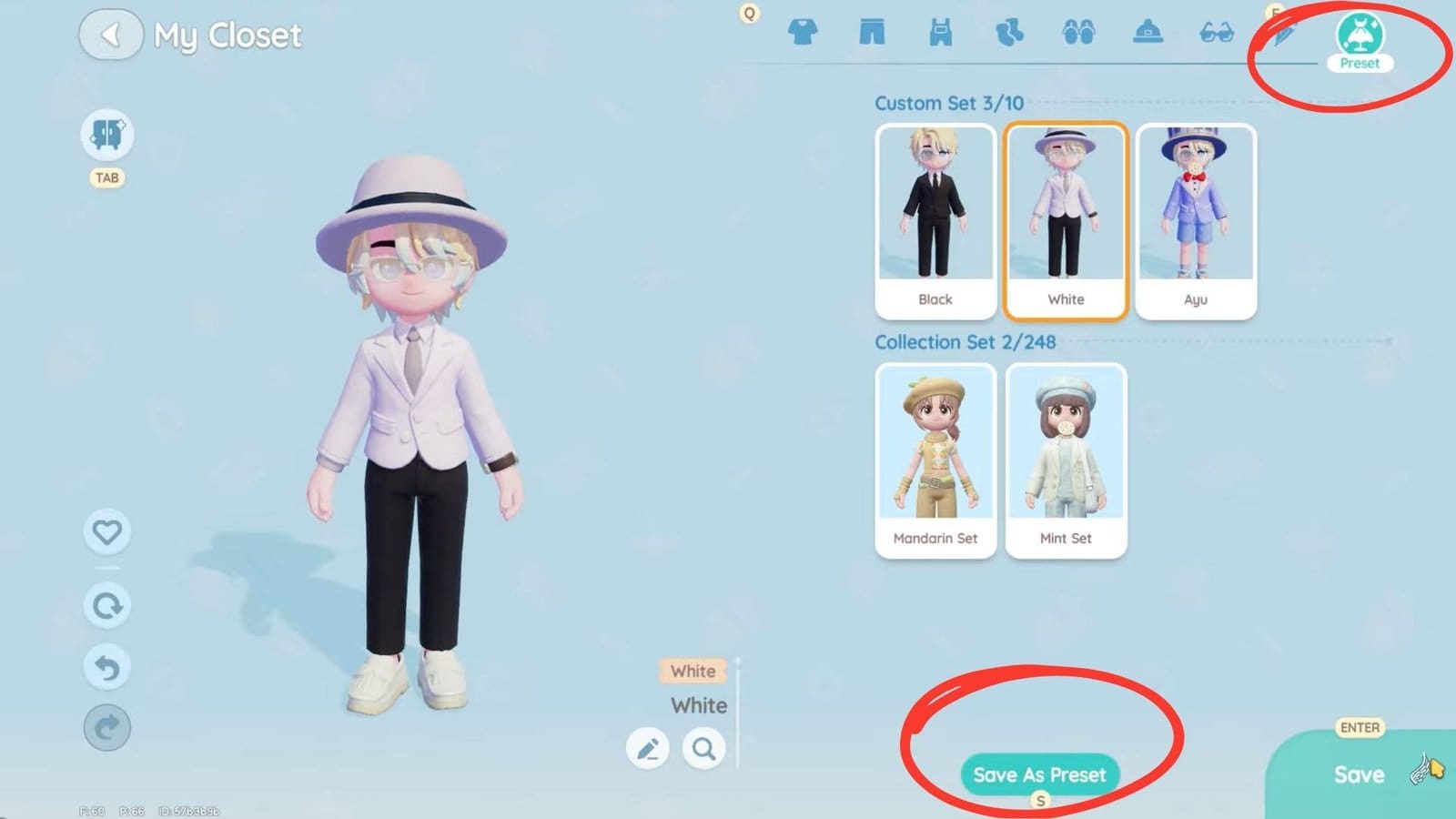
    How to useFind the Save as Preset button at the very bottom of the Closet screen in the Dress-up menu

    How to Get and Use the Save Outfit Preset Feature
    Save Outfit Preset Heartopia
    • First, I had to gather 800 Clothing Collection Points to increase my Collection ranking.
    • For me, I found that the best way to gather enough collection points is to purchase all the outfits from Dorothee’s Clothing Store.
    • Next, to keep track of the points collected, bring up your Smartwatch and go to Collection > Clothing.
    • Click on the puzzle icon at the bottom left corner of the screen, which shows the current points accumulated.
    • Once the necessary points have been collected, head over to the Dress-up menu in the Smartwatch to find a new option at the bottom of the Closet screen.
    • With this, I got to mix and match my outfits, then hit the Save Preset button for easy access later.
    • I could also view all my saved preset outfits by selecting the new dress icon at the top right corner of the Closet menu to find them.

    Read More: Heartopia – How to Complete The Guild’s Requests Quest

    FAQs

    Is there a Save Outfit Preset shortcut?

    Yes, by pressing and holding down the mouse on your character, you get to bring up the Preset Outfit option quickly.

    Where do I find the Save Outfit Preset option?

    You will find the Save Outfit Preset option within your Closet while customizing your character’s clothes.

    How many outfit presets can I save?

    You get to save 10 Custom Sets and 248 Collection Sets.

    Heartopia
    Share. Facebook Twitter Bluesky Reddit WhatsApp Copy Link
    Avatar photo
    Kirthana K
    • Website
    • LinkedIn

    Her lifelong passion of gaming led her to writing about them, bringing words to life and compiling comprehensive game guides that are quick and easy to follow. If not writing, you can catch her exploring Teyvat or the Palpagos Islands.

    Related Posts

    Burglin’ Gnomes – How to Get Grabble

    June 14, 2026

    Burglin’ Gnomes – How to Unlock the Shed

    June 14, 2026

    Burglin’ Gnomes – How to Build the Minicopter

    June 14, 2026

    Burglin’ Gnomes – How to Use the Blender

    June 13, 2026

    Burglin’ Gnomes – How to Find Jonathan

    June 13, 2026

    Burglin’ Gnomes – Best Places to Hide

    June 13, 2026
    EDITOR'S PICKS

    Burglin’ Gnomes – How to Get Grabble

    June 14, 2026

    Burglin’ Gnomes – How to Unlock the Shed

    June 14, 2026

    Burglin’ Gnomes – How to Build the Minicopter

    June 14, 2026

    Burglin’ Gnomes – How to Use the Blender

    June 13, 2026
    DON'T MISS
    Guides

    Super Battle Golf – Hole in One Achievement Guide

    Jordan Blake
    Guides

    Heartopia – The Complete Flower Crossbreeding Guide

    Amar Deogaonkar
    Guides

    Windrose – How to Move or Relocate Items

    Kirthana K
    Guides

    Heartopia – How To Change Hair (& Get More Hairstyles)

    Kirthana K
    Guides

    Marvel Rivals – How to Defeat The Kingpin Hidden Boss

    Kirthana K
    Features

    R.I.P: Reincarnation Insurance Program Review

    Santosh Panda
    Guides

    Where Winds Meet: Lost Crossing – All Encounter Locations

    Santosh Panda
    Guides

    Arknights Endfield – Where to Find Chrysodendra

    Santosh Panda
    Guides

    Forza Horizon 6 – Friends Discovery Challenge Guide

    Kirthana K
    Guides

    MHS3 – How To Unlock All Invasive Monsters

    Sagnik Adhikary
    © 2026 TheGamesWatch
    • Home
    • Our Authors
    • About Us
    • Privacy Policy

    Type above and press Enter to search. Press Esc to cancel.

    We use cookies to ensure that we give you the best experience on our website. If you continue to use this site we will assume that you are happy with it.