
Key Points
- The Tomato Jelly Rampage mission is currently bugged on PlayStation.
- After the boss fight cutscene, players are stuck in an infinite loading screen.
- A patch update to fix this issue will be released soon, but until then, there are other ways to resolve it.
Like most RPGs, Neverness to Everness does come with a handful of bugs. But none are as annoying as the infinite loading screen bug during the Tomato Jelly Rampage mission. This bug completely locks players out of progressing through the rest of the game, and there isn’t a lot that can be done about it right now.
Read More: Neverness to Everness – How to Unlock the Blue Flame Bike
How to Fix the Infinite Loading Screen in Neverness to Everness
Unfortunately for PS players, there seems to be a huge bug where the game enters an infinite loading screen during the Tomato Jelly Rampage Live Report mission. During the cutscene after defeating the Tomato Devil boss, the game gets stuck. The devs have acknowledged the bug and will release a patch update soon. But until then, there are a few things that I tried to get the game up and running again.
Fix #1
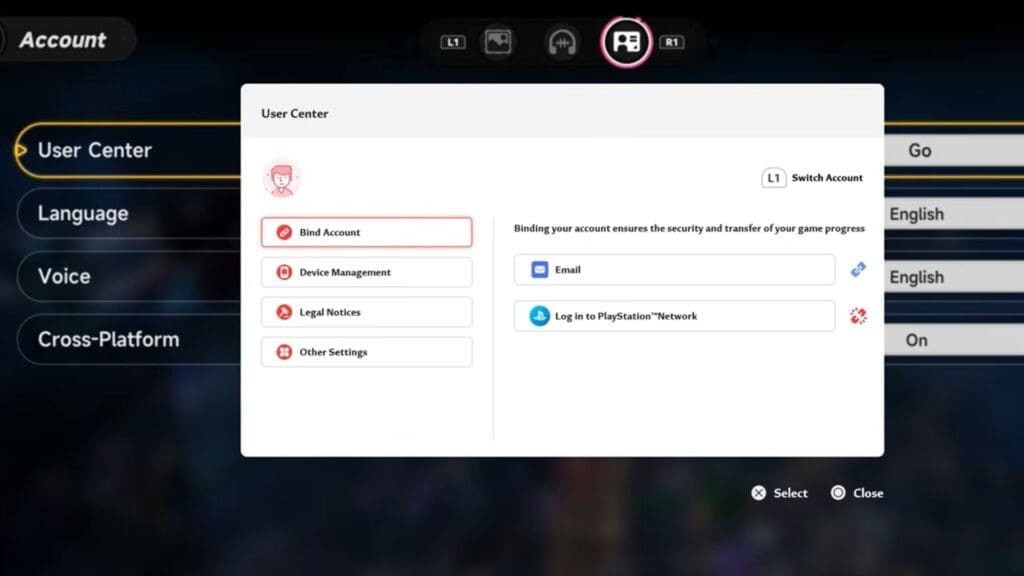
One method is to install the game on another device, such as a mobile or PC. Next, link your PS in-game profile to an email address by accessing the NTE main menu and selecting User Center in account settings.
After linking your profile, use the same email to log in on the other device. Resume your progress and complete the mission, then log back into your PS profile. This skips the problematic cutscene and allows you to continue playing.
Fix #2
If that didn’t work, some players reported waiting a few minutes on the loading screen first. After that, check the internet connection within the PSN settings, then load back into the game. This will send you to the login screen once again, helping you progress through the game normally.
Fix #3
If the above fixes don’t work, you could try the following steps to make the game run again.
- Restarting the system and loading back in.
- Uninstall and reinstall the game.
- Change the internet network or use an Ethernet cable.
- Perform a power restart on the PS and try loading the game.
FAQs
Is this bug exclusive to PS players?
Yes, this bug does not occur while playing on mobile or PC, and it only appears during this particular mission.
When will the patch update be released?
According to the dev notes, there should be a patch update soon, so keep checking for updates frequently and get the latest version of the game to bypass the bug.
Is there any way to skip this mission?
If you haven’t picked up this mission yet or haven’t reached the boss fight, you could wait around for the patch update before continuing forward. Try completing other quests for the time being before coming back here.
