Close Menu

    Subscribe to Updates

    Get the latest creative news from FooBar about art, design and business.

    What's Hot

    RE9 – How To Collect All 3 Detonator Parts

    March 1, 2026

    RE9 – Where To Find Victor’s Office

    March 1, 2026

    Hitman – How to complete Contagion Mission

    March 1, 2026
    Facebook X (Twitter) Instagram
    TheGamesWatchTheGamesWatch
    • Guides
    • Features
    TheGamesWatchTheGamesWatch
    Home»Guides»Windrose – How to Move or Relocate Items
    Guides

    Windrose – How to Move or Relocate Items

    By Kirthana KFebruary 25, 2026Updated:February 25, 20263 Mins Read

    ​Key Points​

    • Items built from the Build menu cannot be moved around.
    • Instead, you need to destroy and rebuild it.
    • After destroying the item, you will get all your invested materials back.

    In Windrose, your base is where you will set up operations to craft and upgrade your utilities. At some time during your exploration of the island, you might find a better location to set up a base or shift things around your existing base to make room for newer structures. The game doesn’t explain how to move things around, which makes the whole process a lot more tedious. ​

    Read More: Windrose – How to Beat Enemy Ships

    Windrose – Demolish Structures Overview

    MenuBuild menu
    Demolish mode key/buttonMiddle mouse button
    Demolish key/buttonLMB

    How to Move Items ​

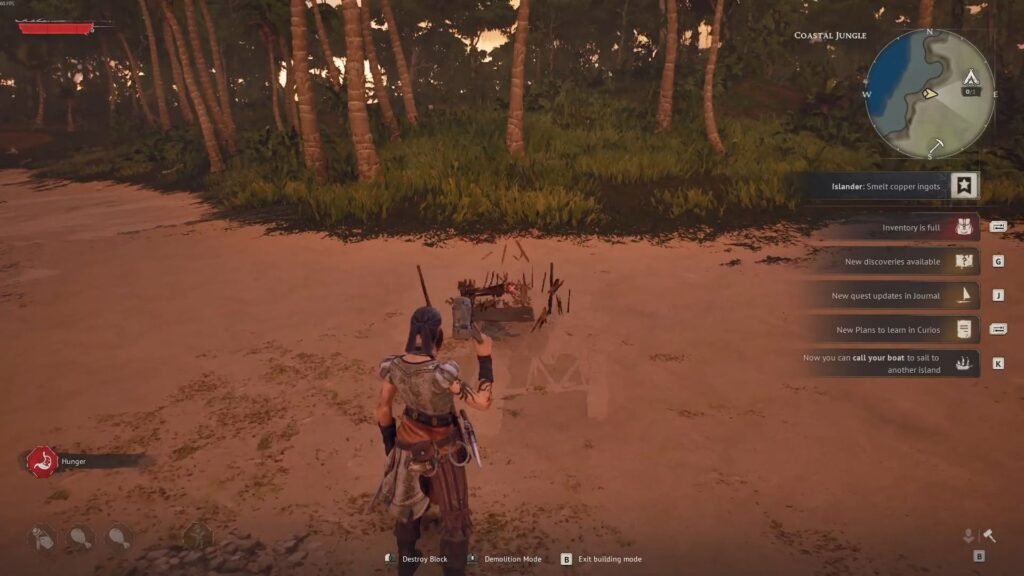
    Currently, there is no move option when selecting a structure at your base. Instead, you need to demolish the item you wish to relocate. To do so, head into the Build menu (B key) and press the middle mouse button to enter Demolish mode. Select the item you wish to remove, which will be highlighted when you place your cursor over it. Left click on the item to destroy it, after which all the resources spent on building the structure will be on the ground. Use this to rebuild the item at a different location. ​

    Read More: Windrose – How to Get & Use Guns

    FAQs​

    How do I relocate NPCs at my base?

    If shifting them to a new base, you need to interact with the bonfire there and select the Settle option. Do not choose the Evict option from your previous bonfire, as this will lose the NPC permanently. ​

    I can’t place new structures on the ground. What do I do?​

    Structures should be placed close to the bonfire’s radius. In case you are building further away, then you need to build another bonfire to place the new structure. ​

    I can’t find the resources after demolishing. What do I do?​

    After demolishing a structure, your invested materials will always be on the floor. If you can’t find them, look around the nearby vicinity, or reload your game to get your resources back. ​

    How do I relocate my base?​

    You need to build a new bonfire at your chosen location and rebuild here. You get to keep or destroy the bonfire of your previous location, or place fast travel points between your bases to travel back and forth.

    Windrose
    Share. Facebook Twitter Bluesky Reddit WhatsApp Copy Link
    Avatar photo
    Kirthana K
    • Website
    • LinkedIn

    Her lifelong passion of gaming led her to writing about them, bringing words to life and compiling comprehensive game guides that are quick and easy to follow. If not writing, you can catch her exploring Teyvat or the Palpagos Islands.

    Related Posts

    RE9 – How To Collect All 3 Detonator Parts

    March 1, 2026

    RE9 – Where To Find Victor’s Office

    March 1, 2026

    Hitman – How to complete Contagion Mission

    March 1, 2026

    RE9 – All Weapon Locations

    February 28, 2026

    RE9 – VIP Suite Puzzle Solution

    February 28, 2026

    RE9 – Care Center Lighter Location

    February 28, 2026
    EDITOR'S PICKS

    RE9 – How To Collect All 3 Detonator Parts

    March 1, 2026

    RE9 – Where To Find Victor’s Office

    March 1, 2026

    Hitman – How to complete Contagion Mission

    March 1, 2026

    RE9 – All Weapon Locations

    February 28, 2026
    DON'T MISS
    Guides

    HumanitZ – How to Deal with Hunger & Thirst

    Kirthana K
    Guides

    Hytale – How to Craft Empty Potion Bottles

    Jordan Blake
    Guides

    Cult of the Lamb DLC – Embrace the Rot or Purge Choice Guide

    Kirthana K
    Guides

    How To Fast Travel in Necesse

    Amar Deogaonkar
    Guides

    Crisol – El Cuerno Albino Cocktail Puzzle Solution

    Kirthana K
    Guides

    My Winter Car – How To Get Out Of Jail

    Kirthana K
    Guides

    YAPYAP – All Puzzles & How to Solve

    Kirthana K
    Guides

    Super Battle Golf – How to Customize Character

    Kirthana K
    Guides

    Abyss Roblox – How To Complete Jungle Update

    Sagnik Adhikary
    Guides

    My Winter Car – How To Sell Scrap Metal To Fleetari

    Kirthana K
    © 2026 TheGamesWatch
    • Home
    • Our Authors
    • About Us
    • Privacy Policy

    Type above and press Enter to search. Press Esc to cancel.

    We use cookies to ensure that we give you the best experience on our website. If you continue to use this site we will assume that you are happy with it.