Close Menu

    Subscribe to Updates

    Get the latest creative news from FooBar about art, design and business.

    What's Hot

    Solarpunk – How to Get and Use Truffles

    June 12, 2026

    Gothic 1 Remake – The Rogues Camp Location Quest Guide

    June 12, 2026

    Solarpunk – Backpack and All Backpack Extension Locations

    June 11, 2026
    Facebook X (Twitter) Instagram
    TheGamesWatchTheGamesWatch
    • Guides
    • Features
    TheGamesWatchTheGamesWatch
    Home»Guides»Paralives – How to Use the Inventory
    Guides

    Paralives – How to Use the Inventory

    By Kirthana KMay 27, 20263 Mins Read

    ​Key Points​

    • The inventory can be accessed via the Build Mode.
    • Once unlocked, you can select the item that you wish to store away.
    • This is a great way to keep unwanted items to sell later, or move items to different locations.

    In Paralives, managing the day-to-day activities of your Paras will take up a large chunk of your time. You would also be in the mood to change the decor of your Para’s home, and you might want to store the old decorations away for another day. That’s when you need to access the inventory to store unwanted items for the time being.​

    Read More: Paralives – How to Buy, Sell, and Move Houses

    Paralives – Inventory Overview

    Where to findBuild Menu
    Inventory slotsInfinite
    Items that can be storedDecor items and quest items

    How to Find the Inventory​

    Image via TheGamesWatch

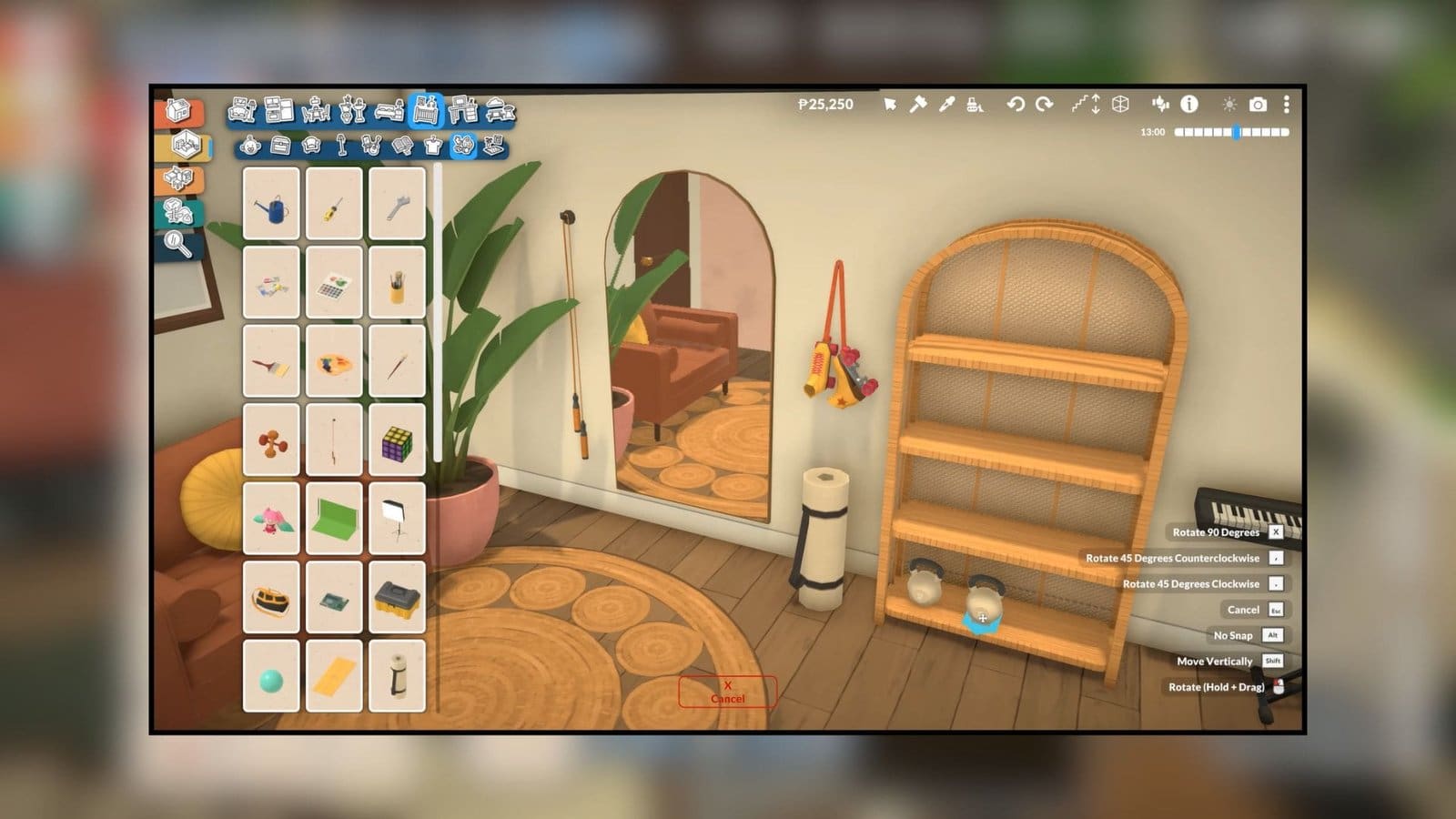
    Having your inventory up and ready is an important part of keeping track of what items you need to store away. Like most sim games, you get to own a storage inventory here, too. Using the inventory from time to time allows you to store items for later use or take out items that you might need later on. But to access the inventory, you need to enter Build Mode. You would have used this mode several times while trying to set up a home for your Paras.

    ​If you are like me and couldn’t find the Build Mode initially, you can find this option in the bottom left corner of the screen. Or you can open Build Mode by pressing the TAB key directly. Whichever way you do it, you should get the new inventory window on the left. This will show you all the items that you had stored away previously, or it will stay empty if you haven’t used it yet.

    ​Using the Inventory​

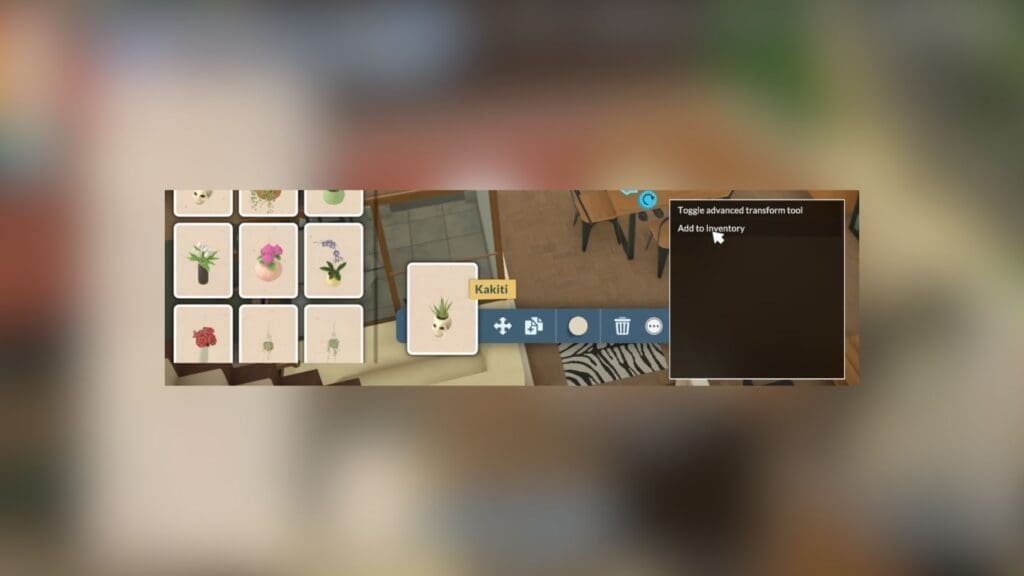
    Next, to store items inside the inventory, all you need to do is select an item in your surroundings while in Build Mode. At the bottom of the screen will be an overview hotbar of the item you have selected. Select the icon with the three dots, then select the Add to Inventory option in the pop-up menu. This item will be automatically added to your inventory.

    ​You can then go around and place the stashed item in a new location by opening up the inventory again and dragging and dropping the item in the new place. You can also use the inventory to store items for donating as part of the main questline. If you wish to sell items, you can store them in the inventory and give them away to the right NPCs when the time is right.

    ​FAQs​

    Why can’t I put down items from my inventory?​

    You can’t place items in areas that don’t belong to you. You can put down items within your purchased lots only.​

    Can I add food to my inventory?​

    Yes, food can be added to your inventory and consumed anytime throughout the day. Plus, food in the inventory will not spoil.​

    Is there a limit for the items I can store in my inventory?​

    No, you can store as many items as you wish, and there are no limits for the type of items you can store, either.

    Paralives
    Share. Facebook Twitter Bluesky Reddit WhatsApp Copy Link
    Avatar photo
    Kirthana K
    • Website
    • LinkedIn

    Her lifelong passion of gaming led her to writing about them, bringing words to life and compiling comprehensive game guides that are quick and easy to follow. If not writing, you can catch her exploring Teyvat or the Palpagos Islands.

    Related Posts

    Solarpunk – How to Get and Use Truffles

    June 12, 2026

    Gothic 1 Remake – The Rogues Camp Location Quest Guide

    June 12, 2026

    Solarpunk – Backpack and All Backpack Extension Locations

    June 11, 2026

    Solarpunk – How to Get Algae

    June 11, 2026

    Solarpunk – How to Craft Seeds​

    June 11, 2026

    Gothic 1 Remake – How to Unlock the Mountain Fortress Chest

    June 10, 2026
    EDITOR'S PICKS

    Solarpunk – How to Get and Use Truffles

    June 12, 2026

    Gothic 1 Remake – The Rogues Camp Location Quest Guide

    June 12, 2026

    Solarpunk – Backpack and All Backpack Extension Locations

    June 11, 2026

    Solarpunk – How to Get Algae

    June 11, 2026
    DON'T MISS
    Guides

    Crimson Desert Renee’s Request – How to Cook Fish Porridge

    Jordan Blake
    Guides

    Icarus Dangerous Horizons – How to Refine Oil

    Jordan Blake
    Guides

    Conan Exiles – How to Fast Travel to the Exiled Lands & Isle of Siptah

    Jordan Blake
    Guides

    HumanitZ – How to Get & Purify Water

    Kirthana K
    Guides

    Arknights Endfield – How To Activate The Guiding Lights

    Kirthana K
    Guides

    Crimson Desert – How to craft Kuku Bismuth Spear

    Jordan Blake
    Guides

    Pokémon Pokopia – How To Create The Hot Spring Shower Habitat

    Kirthana K
    Guides

    The Division Resurgence – How To Find All 13 Secret SHD Crates

    Kirthana K
    Guides

    Avatar From the Ashes DLC – How To Get Battle of Ayram Alusing Armor

    Kirthana K
    Guides

    Burglin’ Gnomes – How to Flush Items Down the Toilet

    Kirthana K
    © 2026 TheGamesWatch
    • Home
    • Our Authors
    • About Us
    • Privacy Policy

    Type above and press Enter to search. Press Esc to cancel.

    We use cookies to ensure that we give you the best experience on our website. If you continue to use this site we will assume that you are happy with it.