
Close Menu

    Subscribe to Updates

    Get the latest creative news from FooBar about art, design and business.

    What's Hot

    Crimson Desert – All 13 Constellation Locations & Solutions

    April 9, 2026

    Disney Dreamlight Valley – How to Get Pocahontas​

    April 9, 2026

    Pokémon Champions – How to Recruit More Pokémon ​

    April 8, 2026
    Facebook X (Twitter) Instagram
    TheGamesWatchTheGamesWatch
    • Guides
    • Features
    TheGamesWatchTheGamesWatch
    Home»Guides»Car Service Together – How to Set the Hub to 16 Inches
    Guides

    Car Service Together – How to Set the Hub to 16 Inches

    By Kirthana KFebruary 9, 20263 Mins Read

    Key Points

    • You need to purchase several 16-inch parts from the Car Service Portal to replace the existing hub.
    • The only station you need to buy here is the Tire Repair Station.
    • Besides that, a handy Car Lift is enough to help you reach under and remove and replace the wheel parts.

    Sometimes, you might receive requests in Car Service Together that might be a bit absurd. One of those requests would be to change the entire hub of the car to make it bigger or smaller. This would take several steps of readjustment, since you need to change a lot of structures on the car to make it work.

    Read More: Car Service Together – How to Paint Cars

    How to Change Hub and Tires to 16 Inches in Car Service Together
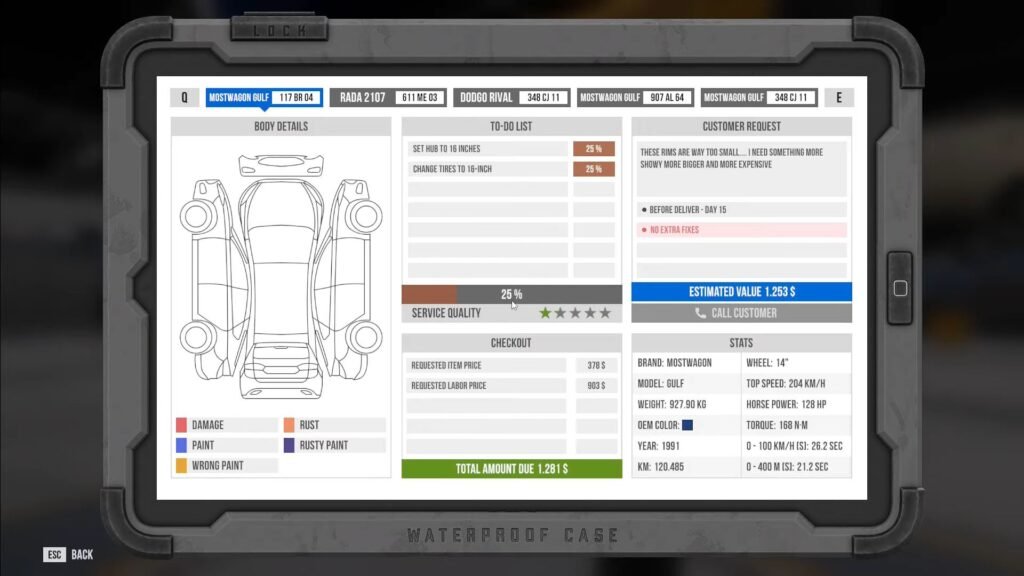
    Place the car on the car lift and press the lift button twice to bring it up. Remove all the old parts first, which include everything from tires, disks, calipers, spacers, etc. Next, head over to the Car Service Portal and purchase 4x each of the following:

    • 16-inch hubs.
    • 16-inch rims.
    • 16-inch wheels.
    • 16-inch calipers.
    • 16-inch disks.
    • 16-inch spacers.
    • 16-inch brake pads.

    You can pick any type of part, unless the client requests otherwise. Once the parts arrive, you need to fix the new tires on the new rims at the Tire Repair Station. After that, head back to the car and press CTRL. This will bring up the parts menu. Select your new parts one by one and add them in order. Once done, you get to tick off this objective and move on to your next task.

    FAQs

    How do I check for my preexisting car parts to use after dismantling?

    If you wish to reattach an old car part, press CTRL to bring up the attachments menu. While checking out the parts, keep an eye out for a spanner icon on them, as this indicates that this part belongs to this particular car.

    Can I change the hub to a higher value?

    If the client requires it, then you can change the hub and make it bigger by purchasing the required parts from the Car Service Portal.

    Will the type of parts purchased influence my rating?

    No, unless specified, you can pick any type of car part. The only thing to keep in mind is the size requirement. Pick the cheaper items within that size to save money.

    Car Service Together
    Share. Facebook Twitter Bluesky Reddit WhatsApp Copy Link
    Avatar photo
    Kirthana K
    • Website
    • LinkedIn

    Her lifelong passion of gaming led her to writing about them, bringing words to life and compiling comprehensive game guides that are quick and easy to follow. If not writing, you can catch her exploring Teyvat or the Palpagos Islands.

    Related Posts

    Crimson Desert – All 13 Constellation Locations & Solutions

    April 9, 2026

    Disney Dreamlight Valley – How to Get Pocahontas​

    April 9, 2026

    Pokémon Champions – How to Recruit More Pokémon ​

    April 8, 2026

    Pokémon Champions – How to Transfer Pokémon Between Champions & Pokémon Home

    April 8, 2026

    Starfield Terran Armada Mission – How To Start The SSNN Broadcast 

    April 8, 2026

    Crimson Desert – All Tommaso Questions Answers (Harvest of Greed Quest)

    April 8, 2026
    EDITOR'S PICKS

    Crimson Desert – All 13 Constellation Locations & Solutions

    April 9, 2026

    Disney Dreamlight Valley – How to Get Pocahontas​

    April 9, 2026

    Pokémon Champions – How to Recruit More Pokémon ​

    April 8, 2026

    Pokémon Champions – How to Transfer Pokémon Between Champions & Pokémon Home

    April 8, 2026
    DON'T MISS
    Guides

    Bizarre Lineage – Tips to find Night Vampires

    Santosh Panda
    Guides

    Arknights Endfield – All Wuling City Protocol Datalogger Locations

    Amar Deogaonkar
    Guides

    Cult of the Lamb DLC – Pardon or Execute the Executioner Choice Guide

    Kirthana K
    Guides

    Scritchy Scratchy – How to Get the Speedrun Achievement

    Kirthana K
    Guides

    God of War Sons of Sparta – All 6 Secret Serpent Locations

    Kirthana K
    Guides

    Scritchy Scratchy – How to Farm Jackpot Points

    Kirthana K
    Guides

    Heartopia – How To Get Free School Outfit

    Santosh Panda
    Guides

    Where Winds Meet Nine Mortal Ways Base – All Encounters

    Amar Deogaonkar
    Guides

    WoW Midnight – How to Unlock Runestone at Saltheril’s Soiree

    Kirthana K
    Guides

    Crisol: Theater of Idols – All Prologue Collectibles

    Sagnik Adhikary
    © 2026 TheGamesWatch
    • Home
    • Our Authors
    • About Us
    • Privacy Policy

    Type above and press Enter to search. Press Esc to cancel.

    We use cookies to ensure that we give you the best experience on our website. If you continue to use this site we will assume that you are happy with it.