

Key Points
- You can now send over visiting Pokémon from the Home app to Champions.
- These Pokémon can be used in battle and played normally in the game.
- While sending Pokémon back, they will not retain their training and upgrades from Champions and return to their default attributes.
Pokémon Champions is another Pokémon fighter to add to your list. But this time, you get to pick and add Pokémon from other titles to the game. This can give you the required mix-up to test your Pokémon’s abilities while in a match. If you haven’t figured out how to transfer your preferred Pokémon to Champions, the process is quite simple.
How to Transfer from Pokémon Home to Pokémon Champions
Sometimes, I would prefer playing with a Pokémon I’m already familiar with rather than starting off from scratch. Transferring Pokémon from one app to another is the best way to get my Pokémon around. Luckily, Pokémon Champions is accepted as a valid transfer point in Pokémon Home. To transfer your Pokémon, just follow what I did below.
Transfer Pokémon from Other Linked Titles to Pokémon Home
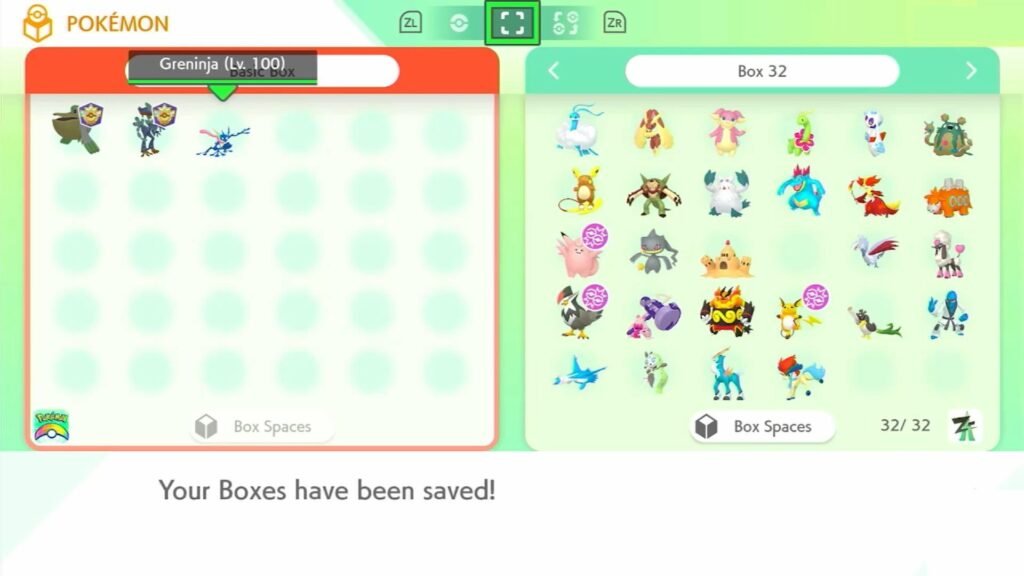
- In case you don’t have any Pokémon in your Pokémon Home, head over to the Pokémon Home main menu first.
- Over here, select the Pokémon box on the right side of the screen.
- Then, select any compatible game title from the list on the right. This will bring you to a new menu with all existing Pokémon within that title.
- Select the Pokémon you wish to transfer from the box on the right and place them in the box on the left.
- Exit the menu and save changes.
- You can check all your newly added Pokémon by selecting the Pokémon box in the main menu of Pokémon Home and selecting the Pokémon Home app. Save your changes while exiting.
Transfer Pokémon to Pokémon Champions
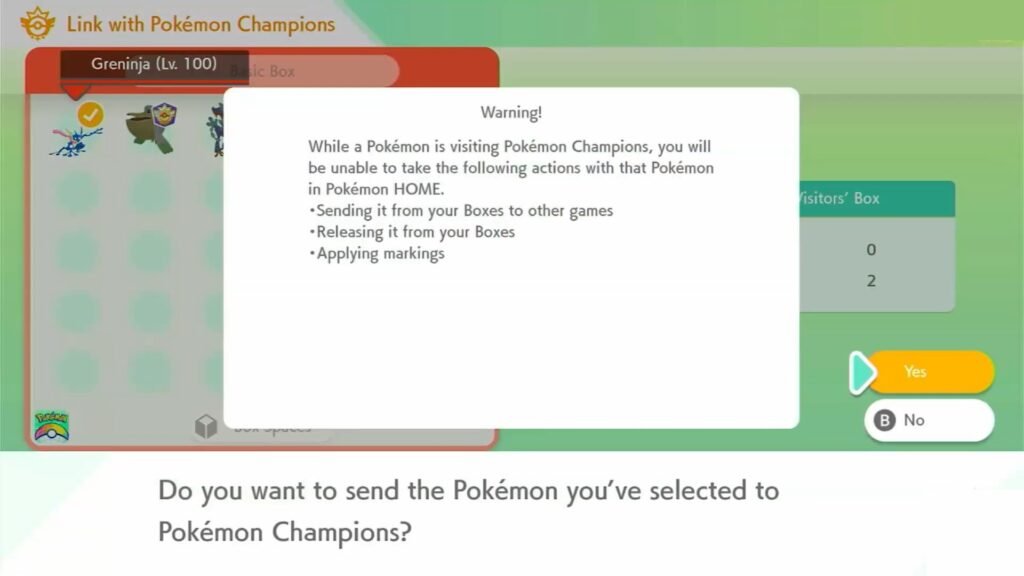
- Head into the Pokémon Home app and click on the Pokémon Champions icon in the bottom right corner.
- This will showcase the available Pokémon that you can select.
- Now that you have your new Pokémon, visit the Pokémon Champions menu again and select your desired Pokémon.
- Press Y to send them for a Visit, after which you can load into Pokémon Champions.
- Select the Collect from Pokémon Home option after clicking on Recruit, then select the Collect from Pokémon Home option again at the bottom.
- Go back to the Pokémon Champions main menu and select the Box option. You will find your newly transferred Pokémon here.
How to Transfer from Pokémon Champions to Pokémon Home
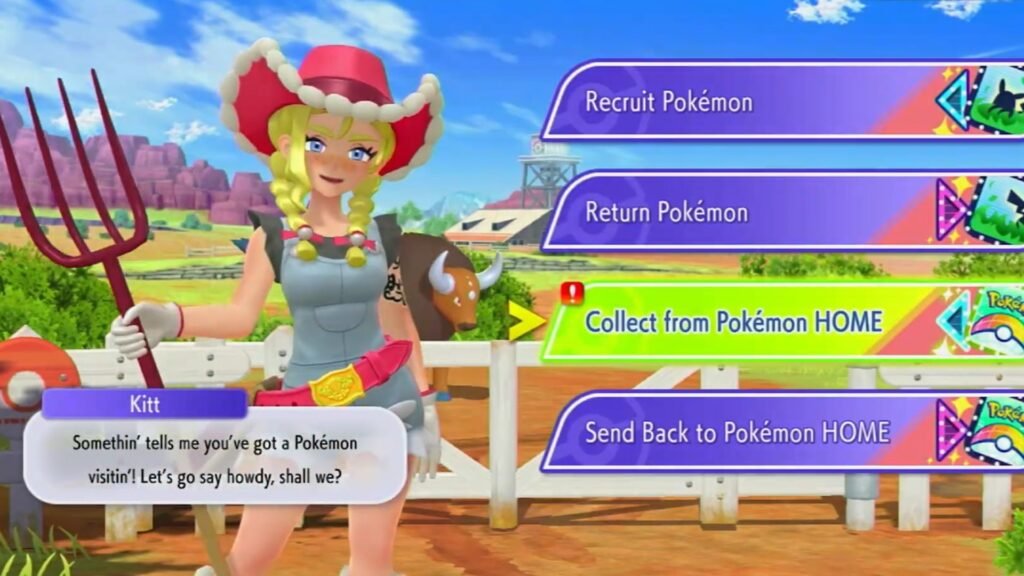
- Open up the Pokémon Champions app and select the Recruit option in the main menu.
- Under this menu, select the Send Back to Home option.
- In the new menu, select the Pokémon you wish to send back to Pokémon Home. Press X after confirming your selection.
- Exit the app, then head back to Pokémon Home and select the Pokémon Champions icon in the bottom right corner.
- You will find your newly sent Pokémon here, and they will stay within the Pokémon section of the Pokémon Home main menu.
FAQs
Can I transfer Pokémon from Pokémon Go?
Yes, to transfer Pokémon from Pokémon Go, head into the Pokémon Go app and select Settings. Select the Connected Devices and Services option and select Pokémon Home. Select your required Pokémon from the list. Transferring Pokémon from Pokémon Go will require sufficient GO Transporter Energy.
Confirm your selection, then visit the Pokémon Home app to find your transferred Pokémon. You can then follow the steps above to transfer Pokémon from Home to Champions. Do note that Pokémon sent from GO cannot return to GO again.
Can I transfer native Pokémon from Pokémon Champions to Pokémon Home?
No, any Pokémon that belongs to Pokémon Champions will remain in the game. You can only transfer visiting Pokémon that are sent from Home.
Can I return Pokémon to the games they came from?
Yes, in most cases, except for Pokémon Go, you can return Pokémon to their respective titles via Pokémon Home after returning them from Champions.
I can’t send my Pokémon from Home to Champions. What do I do?
Make sure that you have linked Champions to the Pokémon Home app first by clicking on the icon in the bottom right corner of the Pokémon Home menu.
I can’t select some of the Pokémon while transferring them. What do I do?
It could be that the Pokémon title you are trying to transfer from is not supported by the Pokémon Home app. Try any other title to transfer Pokémon from them.
