
Close Menu

    Subscribe to Updates

    Get the latest creative news from FooBar about art, design and business.

    What's Hot

    Fortnite: Save the World – How to Unlock Jess Quest

    April 18, 2026

    Tomodachi Life: Living the Dream – How to Raise Happiness

    April 18, 2026

    Tomodachi Life: Living The Dream – Can Miis Cheat?

    April 18, 2026
    Facebook X (Twitter) Instagram
    TheGamesWatchTheGamesWatch
    • Guides
    • Features
    TheGamesWatchTheGamesWatch
    Home»Guides»Hytale – How to Open & Use the Map
    Hytale
    Guides

    Hytale – How to Open & Use the Map

    By Jordan BlakeJanuary 14, 20263 Mins Read

    Key Points

    • Press M to open the map and view explored areas, with your position shown as a blue directional arrow.
    • Players can place map markers, zoom in or out for accuracy, and share markers with others in the same lobby.
    • The map currently appears circular, and it is unknown whether it expands as you explore beyond its visible boundaries.

    How to Open and Use the Map in Hytale
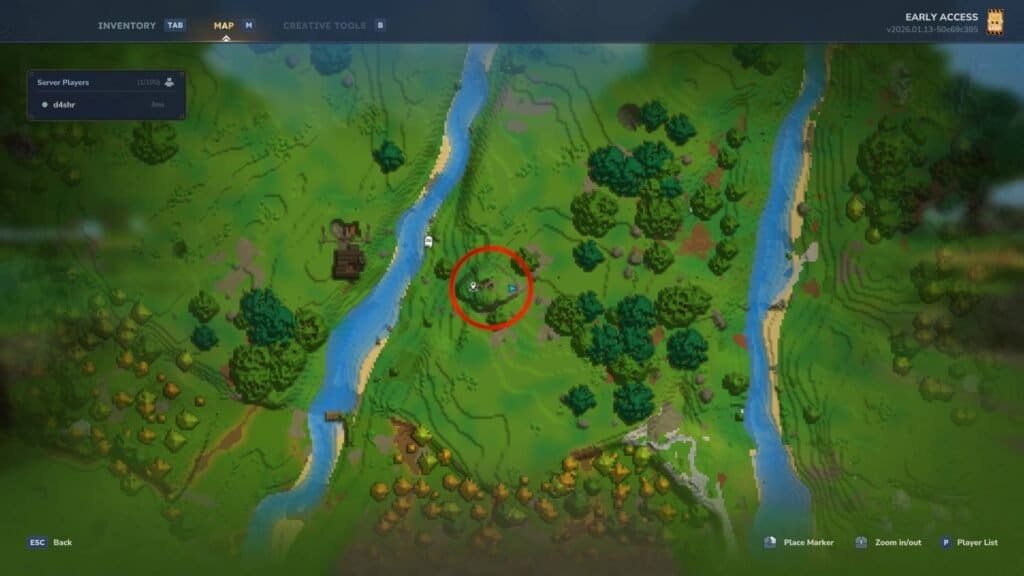
    How to Open Map Hytale

    To open your Hytale map and use it efficiently, follow the steps given below:

    • Open the map in Hytale using the M key. The map displays your surrounding area and explored regions. If you want, you can change the map keybind by making changes in Settings → Controls → Open Map.
    • On the map, your location will be shown by a blue arrow pointing in the direction you are facing.
    • You can place markers by right-clicking on any desired location on the map, and it will drop a pin at that location. You can also zoom in or out using the mouse scroll to place a more accurate pin.
    • However, do note that placed markers are visible on the map but do not appear directly in-game. This means you would have to constantly open and close the map if you are travelling to a pin to stay in the right direction.
    • Other players in your lobby can see the markers you place. The map also shows a player list on pressing the P key, making it easier to track teammates inside the lobby.
    • The map appears as a circle with your blue arrow at the center of it. It’s presently unclear whether the map expands beyond the visible boundaries as you explore further.

    FAQs

    How do I open the map in Hytale?

    You can open the map in Hytale by pressing the M key on your keyboard. If you prefer a different key, you can change the map keybind by going to Settings → Controls → Open Map.

    Can I place markers on the Hytale map, and are they visible in-game?

    Yes, you can place markers by right-clicking on any location on the map. These markers are visible on the map interface but do not appear directly in the game world.

    Can other players see my map markers?

    Yes, other players in your lobby can see the markers you place. Additionally, you can view the player list by pressing the P key, which helps track which teammates are in the server more easily.

    Hytale
    Share. Facebook Twitter Bluesky Reddit WhatsApp Copy Link
    Jordan Blake
    • X (Twitter)
    • Instagram

    Jordan has 3+ years of experience covering Esports and Gaming while diving deep into multiple genres. Trained professionally as a game developer, he has a knack for finding the technical intricacies in games. When he is not writing or playing video games, you can find him travelling to a new destination.

    Related Posts

    Fortnite: Save the World – How to Unlock Jess Quest

    April 18, 2026

    Tomodachi Life: Living the Dream – How to Raise Happiness

    April 18, 2026

    Tomodachi Life: Living The Dream – Can Miis Cheat?

    April 18, 2026

    Fortnite – How to Unlock All Perfected Nature V-Bucks

    April 18, 2026

    Pragmata – All Mini Cabin Locations

    April 18, 2026

    Tomodachi Life: Living the Dream Romance Guide

    April 17, 2026
    EDITOR'S PICKS

    Fortnite: Save the World – How to Unlock Jess Quest

    April 18, 2026

    Tomodachi Life: Living the Dream – How to Raise Happiness

    April 18, 2026

    Tomodachi Life: Living The Dream – Can Miis Cheat?

    April 18, 2026

    Fortnite – How to Unlock All Perfected Nature V-Bucks

    April 18, 2026
    DON'T MISS
    Guides

    Cult Of The Lamb DLC – How to Get the Chosen Child Follower Form

    Kirthana K
    Guides

    Hytale – How To Install & Use Mods

    Jordan Blake
    Guides

    HumanitZ – Where to find Lamborghini “Zombigini”

    Santosh Panda
    Guides

    Where Winds Meet General’s Shrine – All 6 Old Friends Locations

    Amar Deogaonkar
    Guides

    Dragon Quest VII Reimagined – How to get the Magic Carpet

    Kirthana K
    Guides

    Crimson Desert – Abyss Without Balance Quest Walkthrough

    Sagnik Adhikary
    Guides

    Crimson Desert – Bianca Bounty Guide

    Kirthana K
    Guides

    Heartopia – How to Complete The Guild’s Requests Quest

    Kirthana K
    Guides

    Burglin’ Gnomes – How to Deal with Evil Gnomes

    Kirthana K
    Guides

    Crime Scene Cleaner Act 2 – All Secluded Retreat CD Locations

    Kirthana K
    © 2026 TheGamesWatch
    • Home
    • Our Authors
    • About Us
    • Privacy Policy

    Type above and press Enter to search. Press Esc to cancel.

    We use cookies to ensure that we give you the best experience on our website. If you continue to use this site we will assume that you are happy with it.