Close Menu

    Subscribe to Updates

    Get the latest creative news from FooBar about art, design and business.

    What's Hot

    Solarpunk – Backpack and All Backpack Extension Locations

    June 11, 2026

    Solarpunk – How to Get Algae

    June 11, 2026

    Solarpunk – How to Craft Seeds​

    June 11, 2026
    Facebook X (Twitter) Instagram
    TheGamesWatchTheGamesWatch
    • Guides
    • Features
    TheGamesWatchTheGamesWatch
    Home»Guides»Solarpunk – Backpack and All Backpack Extension Locations
    Guides

    Solarpunk – Backpack and All Backpack Extension Locations

    By Kirthana KJune 11, 20263 Mins Read

    ​Key Points​

    • The backpack and its extensions are found near your starting island.
    • You will require an upgraded ship to reach some of the islands where the extenders spawn.
    • The backpack and extenders might be bugged, so you may also need the Lootchest Detector to find them.

    Increasing your inventory in Solarpunk isn’t well explained, but you might have run into an empty backpack while exploring the various islands. With the backpack in hand, you do get some extra space, but owning the backpack extensions will increase your space tenfold.​

    Read More: Solarpunk – How to Get Algae

    Solarpunk – Backpack and Backpack Extension Overview

    Backpack locationChair Island
    Backpack extensions2

    Where to Find Backpack and Backpack Extensions​

    The Backpack Extensions can be found early in the game if you visit the right locations. I found it easier to find the backpack and the extensions after unlocking the Lootchest Detector, as this will pinpoint the exact locations where the backpack extensions might spawn. Besides the detector, you will also need all ship upgrades to explore more islands on the map.

    ​How to Get the Lootchest Detector​

    If you haven’t unlocked the detector yet, you need to unlock the research tiers at the Tradebot. The detector unlocks at Tier 2 research, along with the Trade Bot. Then, trade items with the Tradebot to get Blueprints and use up 1x Blueprint to unlock the Lootchest Detector blueprint. Visit your Energy Crafting Bench and use the following materials to build the Lootchest Detector:

    • 2x Iron
    • 5x Cobalt
    • 2x Copper
    • 4x Circuit Board

    Backpack Location ​

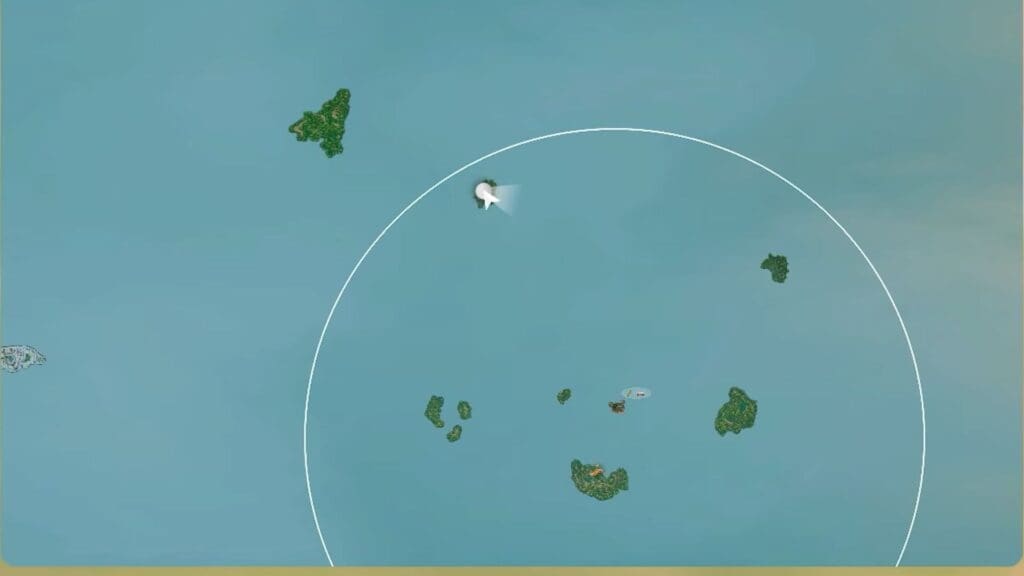
    Image via TheGamesWatch

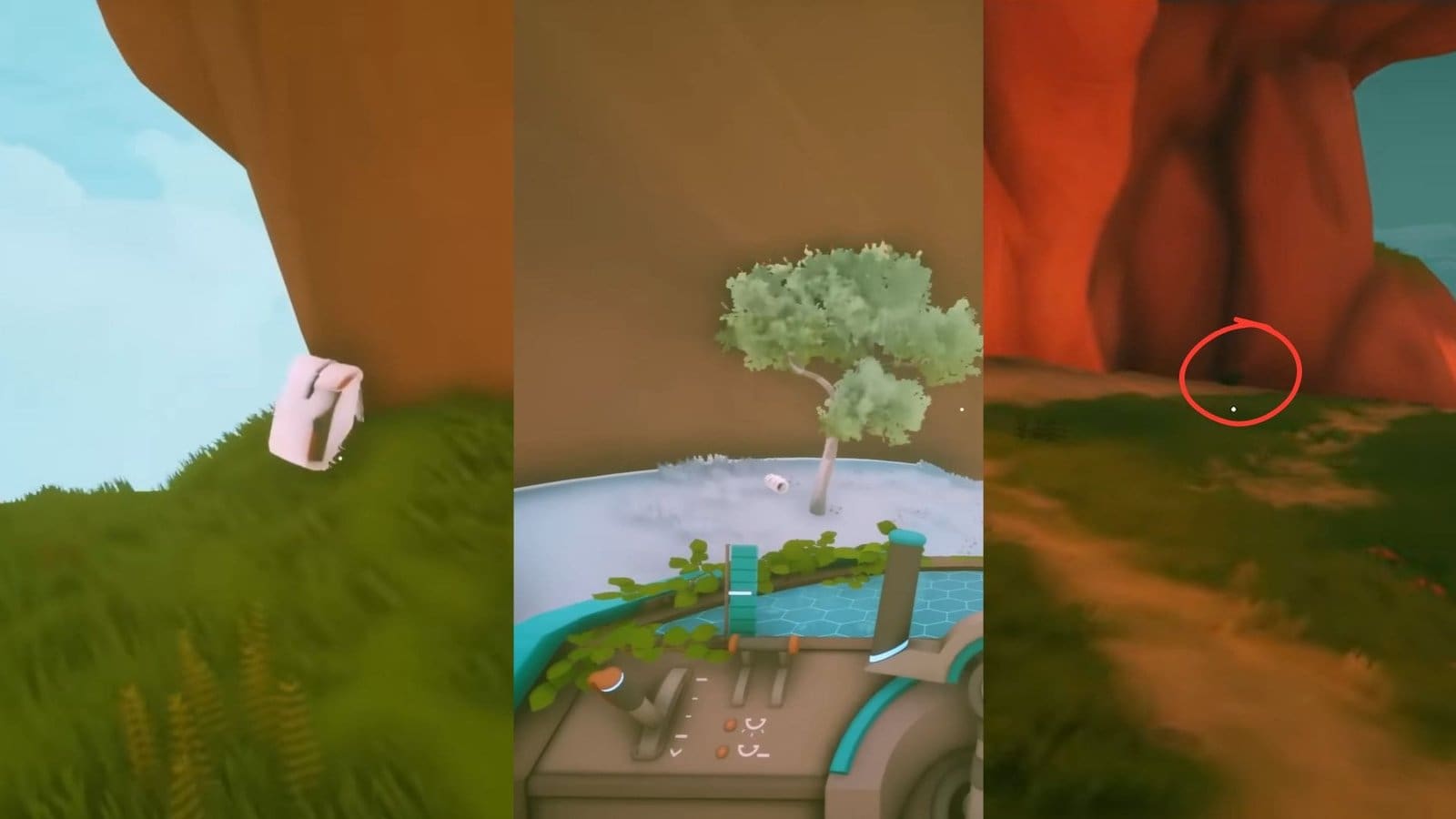
    From your base island, travel to the northwestern island called Chair Island, which is marked on the map above. From here, walk around the slopes to the north and follow the dirt path through the rocky formation. Once you reach the edge, you will find a backpack on the ground. You need to collect the backpack first before finding the extensions. ​

    Backpack Extension Location #1​

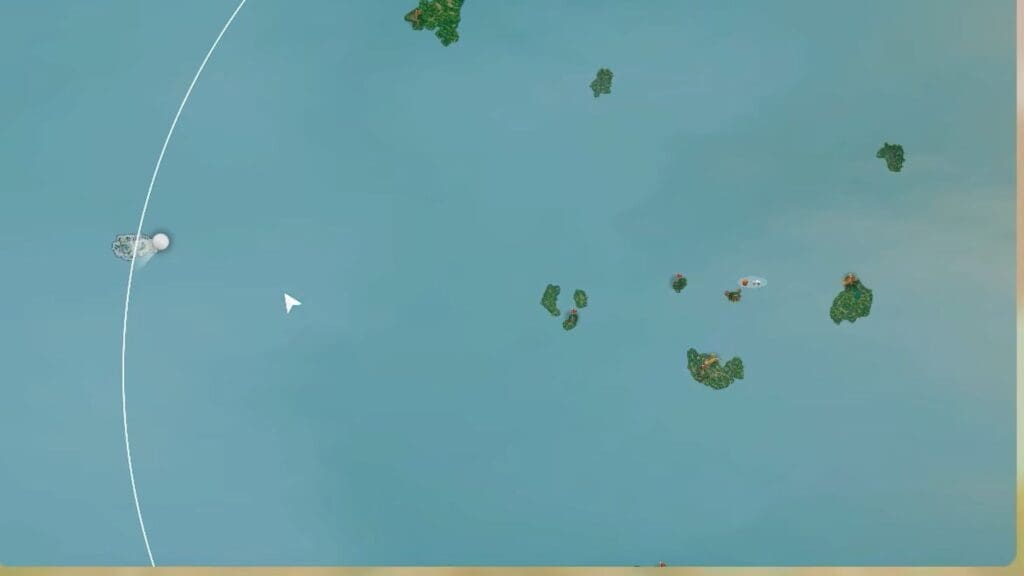
    Image via TheGamesWatch

    I found the first extension by chance while making my way far west to find a snowy island called Stairs Island. You don’t need to dock at the island, as you just need to fly around the base of the island. You will spot a small piece of land you can hop on, and over here is the first backpack extension.​

    Backpack Extension Location #2​

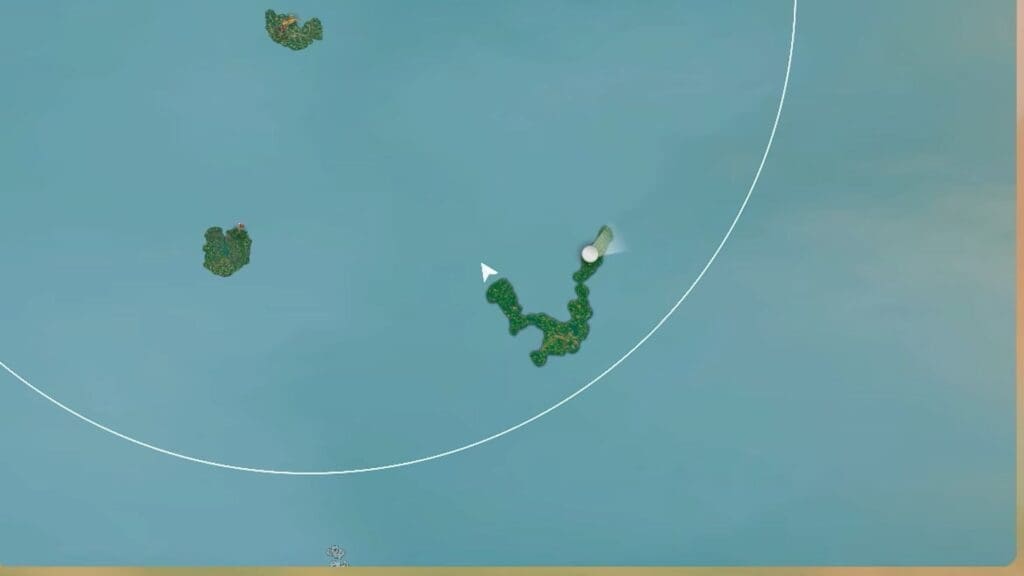
    Image via TheGamesWatch

    Make your way to the southeastern island called Worm Island. While here, head over to the northeastern tip of the island. While sticking to the dirt tracks, look around for the backpack extender on the floor. It is found near the rocky archway.

    Read More: Solarpunk – How to Craft Seeds​

    ​FAQs​

    How many extra slots will I get after finding the backpack and the extensions?​

    Finding the backpack will give you an additional 18 inventory slots, while each extension will give you an additional 14 slots.​

    Are there more extensions to find?

    ​So far, there are only 2 backpack extensions to find. ​

    The backpack doesn’t spawn for me. What do I do?​

    This is a common bug, and the only way to find the backpack is to use the Lootchest Detector while in the area, scan around, and have it spawn.

    Solarpunk
    Share. Facebook Twitter Bluesky Reddit WhatsApp Copy Link
    Avatar photo
    Kirthana K
    • Website
    • LinkedIn

    Her lifelong passion of gaming led her to writing about them, bringing words to life and compiling comprehensive game guides that are quick and easy to follow. If not writing, you can catch her exploring Teyvat or the Palpagos Islands.

    Related Posts

    Solarpunk – How to Get Algae

    June 11, 2026

    Solarpunk – How to Craft Seeds​

    June 11, 2026

    Gothic 1 Remake – How to Unlock the Mountain Fortress Chest

    June 10, 2026

    Gothic 1 Remake – Where to Find Grapes

    June 10, 2026

    Solarpunk – How to Get & Use Sprinklers

    June 9, 2026

    Solarpunk – How to Get and Use the Transport Drone

    June 9, 2026
    EDITOR'S PICKS

    Solarpunk – Backpack and All Backpack Extension Locations

    June 11, 2026

    Solarpunk – How to Get Algae

    June 11, 2026

    Solarpunk – How to Craft Seeds​

    June 11, 2026

    Gothic 1 Remake – How to Unlock the Mountain Fortress Chest

    June 10, 2026
    DON'T MISS
    Guides

    Cult of the Lamb DLC – How to Prepare for Woolhaven

    Kirthana K
    Guides

    WoW Midnight – Harandar Highest Peaks Guide

    Kirthana K
    Guides

    Windrose – How to Defeat High Priestess and Get Charon’s Obol

    Kirthana K
    Guides

    RE9 – Tofu Survivor Easter Egg Guide

    Kirthana K
    Guides

    Quarantine Zone: The Last Check – Skeletons in the Closet Mission Guide

    Kirthana K
    Guides

    Pokémon Pokopia – How To Move And Destroy Buildings

    Kirthana K
    Guides

    Dragon Quest 7 Reimagined – Pit of Silence Light Mirror Puzzle Solution

    Kirthana K
    Guides

    Delta Force – All Treasure Hunt Locations on Zero Dam Map

    Jordan Blake
    Guides

    Animal Crossing: New Horizons 3.0 – How to Play All Classic Nintendo Games

    Amar Deogaonkar
    Guides

    Code Vein 2 – All Endings Guide

    Jordan Blake
    © 2026 TheGamesWatch
    • Home
    • Our Authors
    • About Us
    • Privacy Policy

    Type above and press Enter to search. Press Esc to cancel.

    We use cookies to ensure that we give you the best experience on our website. If you continue to use this site we will assume that you are happy with it.