
Close Menu

    Subscribe to Updates

    Get the latest creative news from FooBar about art, design and business.

    What's Hot

    How To Get Faith in Graveyard Keeper 2

    September 19, 2026

    How to Get a Fishing Rod from Twins in Graveyard Keeper 2

    September 19, 2026

    How To Cure Insanity in Graveyard Keeper 2

    September 18, 2026
    Facebook X (Twitter) Instagram
    TheGamesWatchTheGamesWatch
    • Guides
    • Features
    • Game Hubs
    TheGamesWatchTheGamesWatch
    Home»Guides»StarRupture – How to unlock the Map
    StarRupture Map View
    Guides

    StarRupture – How to unlock the Map

    By Santosh PandaJanuary 6, 2026Updated:January 6, 20263 Mins Read
    • The map will reveal every explored area prior to the unlock, and further exploration will reveal more new er areas.
    • The map can be unlocked by levelling up to level 3 in the Moon Energy Corporation.
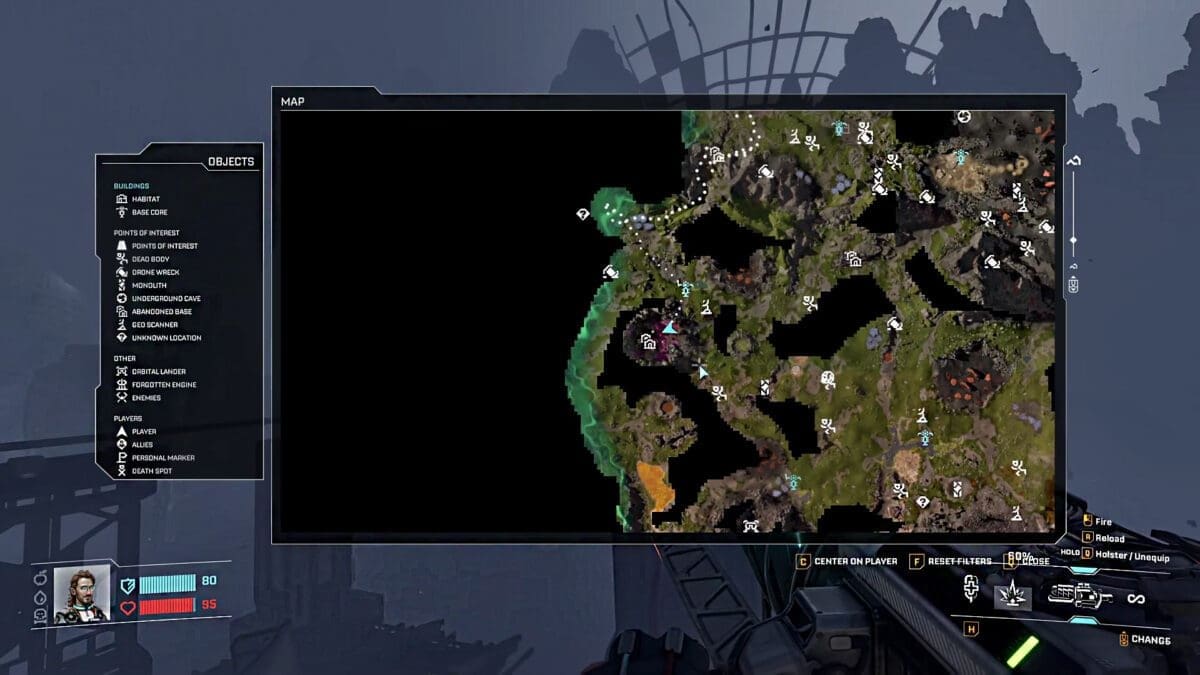
    • The map will help you track down Points of Interest, Dead Body, Monolith, Drone Wreck, Underground Cave, Abandoned Base, Geo Scanner, and many Unknown Locations.

    When you start StarRupture for the very first time, you will have the map feature locked. It can only be unlocked by meeting specific requirements. Overall, a map is a must-have feature for exploring the world, as it reveals almost all secrets and mysteries in the zone.

    Map Overview

    Map Level RequirementLevel 3
    Research TreeMoon Energy Corporation
    Required StationCorporate Terminal
    Item DescriptionUnlocks Map

    The game goes even further and saves the data from all explored areas into its system. So when you unlock the map, it will have all the explored areas in the reveal section without having to redo everything.

    How to Unlock Map in StarRupture

    StarRupture Map Unlock Corporate Terminal

    You will need 1500 Data Points to reach level 3 in Moon Energy Corporation in the Corporate Terminal. After reaching level 3, you will see the option to claim the Map under Moon Energy Corporation.

    Unlike other unlocks, you don’t need to gather Basic Building Materials to build the map; it is a feature that can be opened almost immediately after claiming it. You use the key “M” on your keyboard to open up the map to see all the surroundings and keep track of many interesting landmarks.

    On the map, if you takea look at the left panel, you will see all the Legend options that include your buildings and all points of interest in the area. All explored areas will automatically get revealed on the map, while the unexplored areas will be covered in shadows. This will help farming for useful materials like Titanium ore in StarRupture that much easier.

    You can use the shadows as an indicator to head into the uncharted areas of the map to accidentally stumble upon something new. Once you explore an interesting landmark, the map will save the spot so you can come back to the place later on.

    FAQs

    Should I save the Map upgrade for later?

    While yes, you can save the upgrade for later, getting it at an earlier playthrough will help you fasten the explorations. You will easily skip the areas that have been explored and focus on the unexplored regions of the game.

    Why can’t I open up the Map in StarRapture?

    You will have to build a Corporate Terminal and spend Data Points to unlock the option to view the map. Focus on gathering a good amount of Data Points to unlock the option to get the map in the game.

    What can I view on a map?

    On the map, you can view your Habitat and Base Core. Along with the basics, the map will also help you with Points of Interest, Dead Body, Monolith, Drone Wreck, Underground Cave, Abandoned Base, Geo Scanner, and many Unknown Locations. It also reveals enemies, allies, death spots, player location, and many more.

    StarRupture
    Share. Facebook Twitter Bluesky Reddit WhatsApp Copy Link
    Santosh Panda
    • LinkedIn

    With 5 years of writing experience, Santosh hopes to help many fight the big monsters, solve intricate puzzles, disarm the hidden traps, and finally open the treasure box.

    Related Posts

    How To Get Faith in Graveyard Keeper 2

    September 19, 2026

    How to Get a Fishing Rod from Twins in Graveyard Keeper 2

    September 19, 2026

    How To Cure Insanity in Graveyard Keeper 2

    September 18, 2026

    How to Get Zombies in Graveyard Keeper 2

    September 18, 2026

    How to Get More Customers in TCG Card Shop Simulator

    September 18, 2026

    How To Cleanse Smelly Customers in TCG Card Shop Simulator​

    September 17, 2026
    EDITOR'S PICKS

    How To Get Faith in Graveyard Keeper 2

    September 19, 2026

    How to Get a Fishing Rod from Twins in Graveyard Keeper 2

    September 19, 2026

    How To Cure Insanity in Graveyard Keeper 2

    September 18, 2026

    How to Get Zombies in Graveyard Keeper 2

    September 18, 2026
    DON'T MISS
    Guides

    How to Increase Inventory Space in How to Fish

    Kirthana K
    Guides

    Neverness To Everness – How To Get Day Off Arc

    Kirthana K
    Guides

    Seven Deadly Sins Origin – How to Get the Domesticated Wind Spirit

    Kirthana K
    Guides

    LEGO Batman: Legacy of the Dark Knight – How to Play Co-Op Multiplayer

    Kirthana K
    Guides

    Heartopia – How To Get Exhibition Passes

    Kirthana K
    Guides

    Quarantine Zone: The Last Check – Modern Prometheus Quest Guide 

    Kirthana K
    Guides

    HumanitZ – How to Find, Tame, & Use Horses

    Kirthana K
    Guides

    Super Battle Golf – How to Attack Players

    Kirthana K
    Guides

    WoW Midnight – Thrill of the Chase Achievement Guide

    Kirthana K
    Guides

    Far Far West – All 4 Medal Locations

    Kirthana K
    © 2026 TheGamesWatch
    • Home
    • Our Authors
    • About Us
    • Privacy Policy

    Type above and press Enter to search. Press Esc to cancel.

    We use cookies to ensure that we give you the best experience on our website. If you continue to use this site we will assume that you are happy with it.